

Phone Vlog Selfie Monitor Screen - Rear Camera Vlog Monitor PH01 Max
Phone Vlog Selfie Monitor Screen - Rear Camera Vlog Monitor PH01 Max
Price subject to change. Tap below for current.
Couldn't load pickup availability
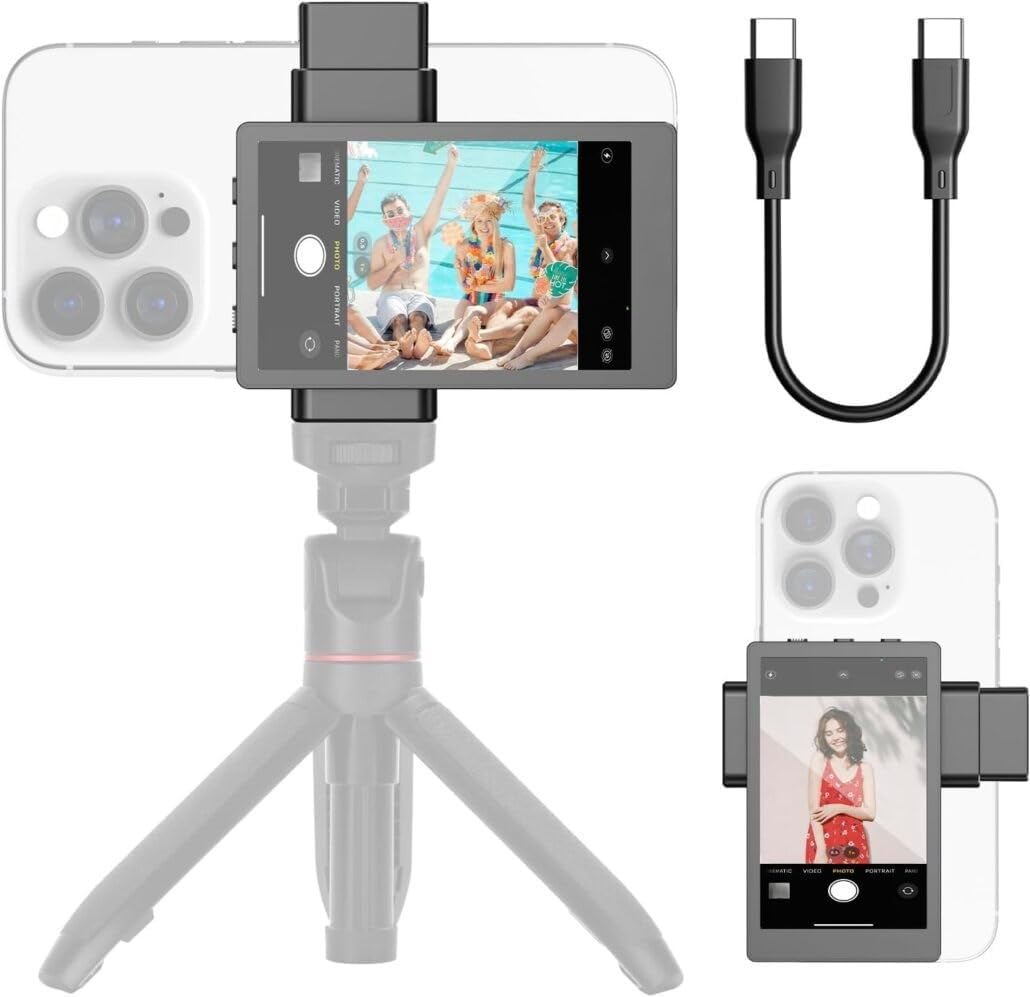
In this review of the Phone Vlog Selfie Monitor Screen PH01 Max the bottom line is simple: this gadget is for creators who want the superior image quality of their phone's rear camera while keeping framing and control in hand. The reviewer found the magnetic clip and real-time screen sharing make shooting solo vlogs and live streams noticeably easier, and the included Bluetooth remote plus a reversible mirror button solve common setup headaches. It is not for users of unsupported phones, but for iPhone and many Android owners it turns the rear camera into a practical selfie solution.
Key Features
- Real-time Screen Sharing: Lets you view your phone camera feed live on the monitor so you can frame with the sharper rear lens rather than guessing with the front camera.
- Magnetic Clip Mount: The unique attachment system quickly secures the monitor to the phone for steady, repeatable positioning during vlogs or streams.
- Universal Phone Holder: The flexible holder extends from 3.15 to 4.33 in so it fits a wide range of iPhones and Android phones while offering a 1/4 in screw hole for mics or lights.
- 33 ft Bluetooth Remote: The wireless remote pairs with the phone to trigger shots or start recording from a distance, useful for tripods or group shots.
- Screen Mirror Image and Charging: A mirror button flips inverted images and the monitor recharges via included type-C cable from power banks or laptop USB ports.
- Portable Kit: Lightweight design and a soft velvet bag keep the monitor, remote and cable organized for on-the-go use.
Who It's For
Content creators who prioritize image quality and portability will get the most from this monitor: solo vloggers, TikTok or Instagram creators, and livestream hosts who want to use their rear phone camera without a second operator. The direct connect option minimizes lag for reliable framing and the accessory screw hole supports common on-camera kits.
People who should look elsewhere include owners of unsupported phones, specifically GOOGLE PIXEL models, and those who need built-in monitor audio for on-camera playback, as this monitor does not include a speaker and audio routed during screen sharing will not be heard through the unit.
Pros & Cons
Pros
- Enables high-quality rear-camera selfies with live monitoring for precise framing.
- Magnetic clip and extendable holder make attachment fast and broadly compatible.
- Included Bluetooth remote with roughly 33 ft range enables convenient remote control.
- Type-C charging and a soft carrying bag improve portability and everyday use.
Cons
- Does not support GOOGLE PIXEL phones, which limits compatibility for some Android users.
- No built-in speaker, so audio played during screen sharing cannot be heard from the monitor.
Specifications
| Product | Phone Vlog Selfie Monitor Screen PH01 Max |
| Primary use | Rear camera monitoring for selfies, vlogs, live streams |
| Phone holder range | 3.15 - 4.33 in |
| Remote | Bluetooth remote control, up to 33 ft range |
| Charging | Type-C charging cable included, works with 5V/0.5A power sources |
| Accessory mount | 1/4 in screw hole for mic or light attachment |
| Compatibility notes | Compatible with iPhone and many Android phones; does not support GOOGLE PIXEL |
Our Verdict
The PH01 Max is a practical, well-designed monitor for creators who want the clarity of a rear camera without a second operator. It pairs useful hardware like a magnetic clip, remote and accessory mount with simple mirror and charging controls, making it good value for vloggers and streamers who travel or shoot alone. If your phone is supported, this is an effective way to upgrade everyday mobile video.
Frequently Asked Questions
Will this work with all phones?
The monitor fits many iPhones and Android phones within the 3.15 to 4.33 in holder, but it does not support GOOGLE PIXEL phones.
How do I avoid lag when mirroring?
Use the direct connect option rather than WLAN to minimize lag during screen sharing for the most responsive live view.
Can I charge the monitor on the go?
Yes, it uses a type-C port and can be charged from a power bank, laptop or 5V/0.5A charger; a type-C cable is included.
Editor's Take
The PH01 Max is a practical monitor that lets creators use the rear camera with live view, a magnetic clip, remote and accessory mount; good value for supported iPhone and Android users who shoot solo.

Recently viewed
Recently viewed products will appear here as customers browse the store.