

RGB Cooling Fan for Xbox Series X - Adjustable Auto Fan and 7 RGB
RGB Cooling Fan for Xbox Series X - Adjustable Auto Fan and 7 RGB
Price subject to change. Tap below for current.
Couldn't load pickup availability
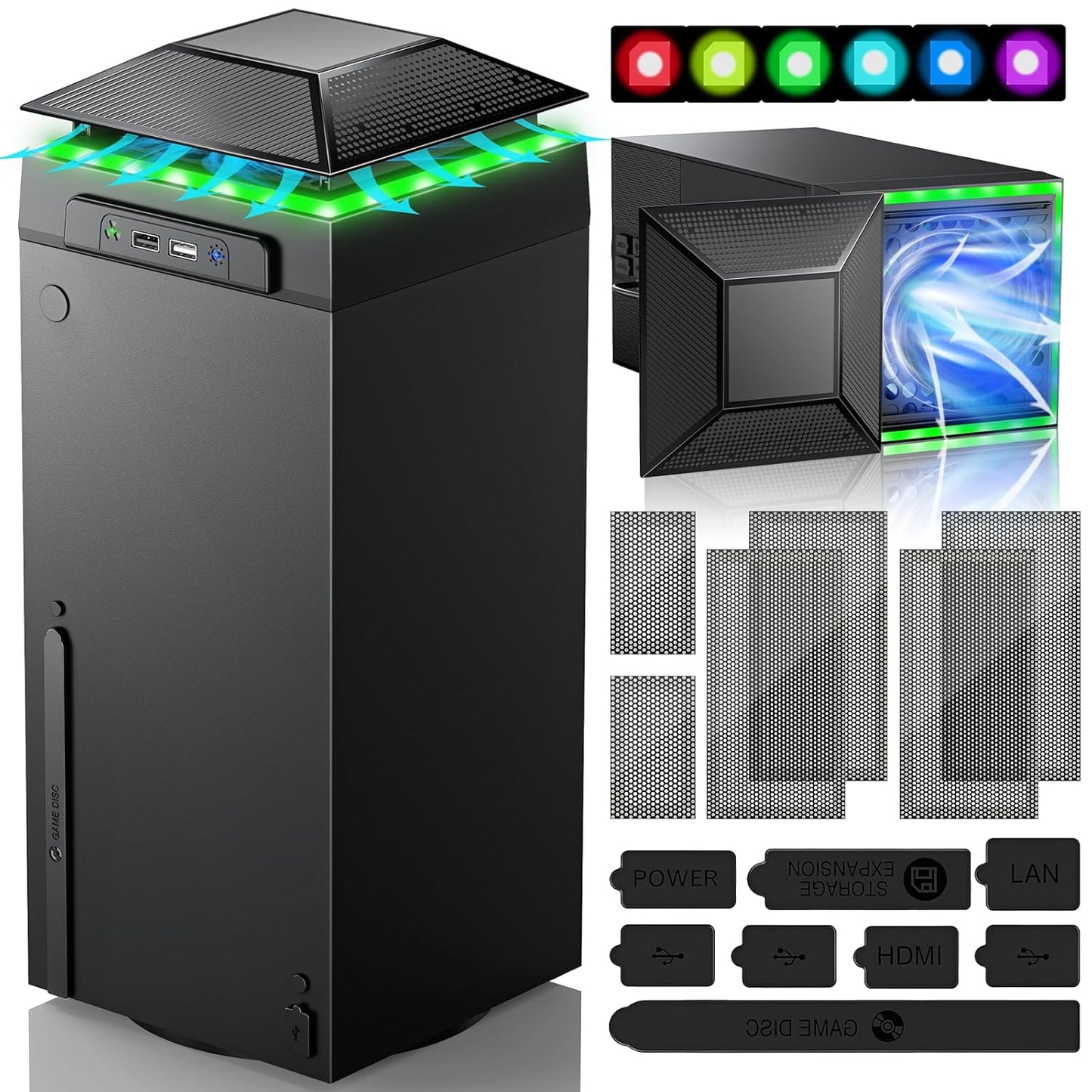
In this review of the RGB Cooling Fan for Xbox Series X, the bottom line is simple: this accessory is aimed at players who want a neat way to manage heat and add lighting without permanent modification. The unit is a compact top-mounted cooler with both automatic temperature-sensing fan control and manual touch adjustments, plus a sliding dust cover and filter accessories. It is best for owners looking for quieter, hands-off cooling most of the time while also wanting a customizable light show and a couple of handy USB ports for charging or data.
Key Features
- Auto fan speed: A built-in smart chip senses exhaust temperature and automatically adjusts fan speed to reduce overheating risk without user intervention.
- Manual control: An independent touch switch lets you step through medium, high, or off fan speeds when you prefer direct control.
- Seven RGB modes: The separate light switch cycles seven lighting effects, including running, breathing, and solid color modes, and saves your preferred effect.
- Sliding dust cover: The cover opens to improve airflow during heavy play and closes to protect ports from dust when the console is idle.
- USB ports and filters: Includes one data-capable USB 2.0 port and one USB charging port plus dust cover filters and silicone plugs to protect USB and HDMI openings.
- Horizontal placement: Designed for horizontal or vertical use so it can sit under a TV or on a game table while keeping the console stable.
Who It's For
The accessory suits Xbox Series X owners who want a low-effort addition to reduce thermal strain and add cosmetic lighting; the auto mode is convenient for gamers who do not want to fiddle with settings. It is also useful for players who often place their console horizontally and need a cover that doubles as a small platform for controllers or a lighter gaming setup.
Those who need industrial-grade cooling for extreme overclocking sessions or who prefer an internal cooling upgrade should look elsewhere; this is an external, modest-capacity cooler that improves everyday thermal management rather than replacing built-in hardware. Also, if near-silent operation is an absolute requirement, check user reports about variable noise levels at higher fan speeds.
Pros & Cons
Pros
- Automatic temperature sensing provides convenient, hands-off fan speed adjustment for typical gaming sessions.
- Independent controls keep lighting and fan functions separate, so users can run lights without the fan and vice versa.
- Includes practical extras like two USB ports and dust filters that protect HDMI and USB openings and add longevity to the console.
- Sliding cover offers both improved airflow when open and dust protection when closed, adding flexibility for horizontal placement.
Cons
- Cooling capacity reports are mixed; some users see clear benefits while others find it only a modest improvement.
- Noise at higher manual fan speeds can be noticeable during intense use, according to some feedback.
Specifications
| Compatibility | Xbox Series X |
| Lighting modes | 7 RGB modes (running, water, breathing, 4 solid colors) |
| Fan control | Auto mode (temperature-sensing) and manual touch speed steps |
| USB ports | One USB 2.0 data port and one USB 2.0 charging port |
| Accessories | Sliding dust cover, 2 dust filters, silicone dust plugs |
| Placement | Horizontal or vertical console orientation |
Our Verdict
For most Series X owners who want a neat balance between convenience and aesthetics, this RGB Cooling Fan is a smart, cost-effective accessory: the automatic fan mode and dust protection are practical day-to-day benefits, while the independent lights and extra USB port add useful flair. It represents good value for casual to moderate players, though those seeking heavy-duty cooling should consider more powerful solutions.
Frequently Asked Questions
Will this cool my Series X enough to prevent crashes?
It can reduce overheating during regular play and some customers reported fewer crashes, but results vary and it is not a replacement for internal cooling upgrades.
How do the light and fan switches work?
The fan has a touch switch to toggle auto and manual speeds; a separate light switch cycles seven effects and can save the selected mode with a long press.
Do the filters and plugs really protect ports?
Yes, the included dust filters and silicone plugs are sized for the Series X to help block dust from USB and HDMI ports when the cover is closed.
Editor's Take
A practical accessory for Series X owners who want hands-off cooling and cosmetic RGB lighting; offers sensible dust protection and useful USB ports, though cooling gains vary by use.

Recently viewed
Recently viewed products will appear here as customers browse the store.