

RGB SATA to USB 3.0 Hard Drive Docking Station - Offline Clone Ready
RGB SATA to USB 3.0 Hard Drive Docking Station - Offline Clone Ready
Price subject to change. Tap below for current.
Couldn't load pickup availability
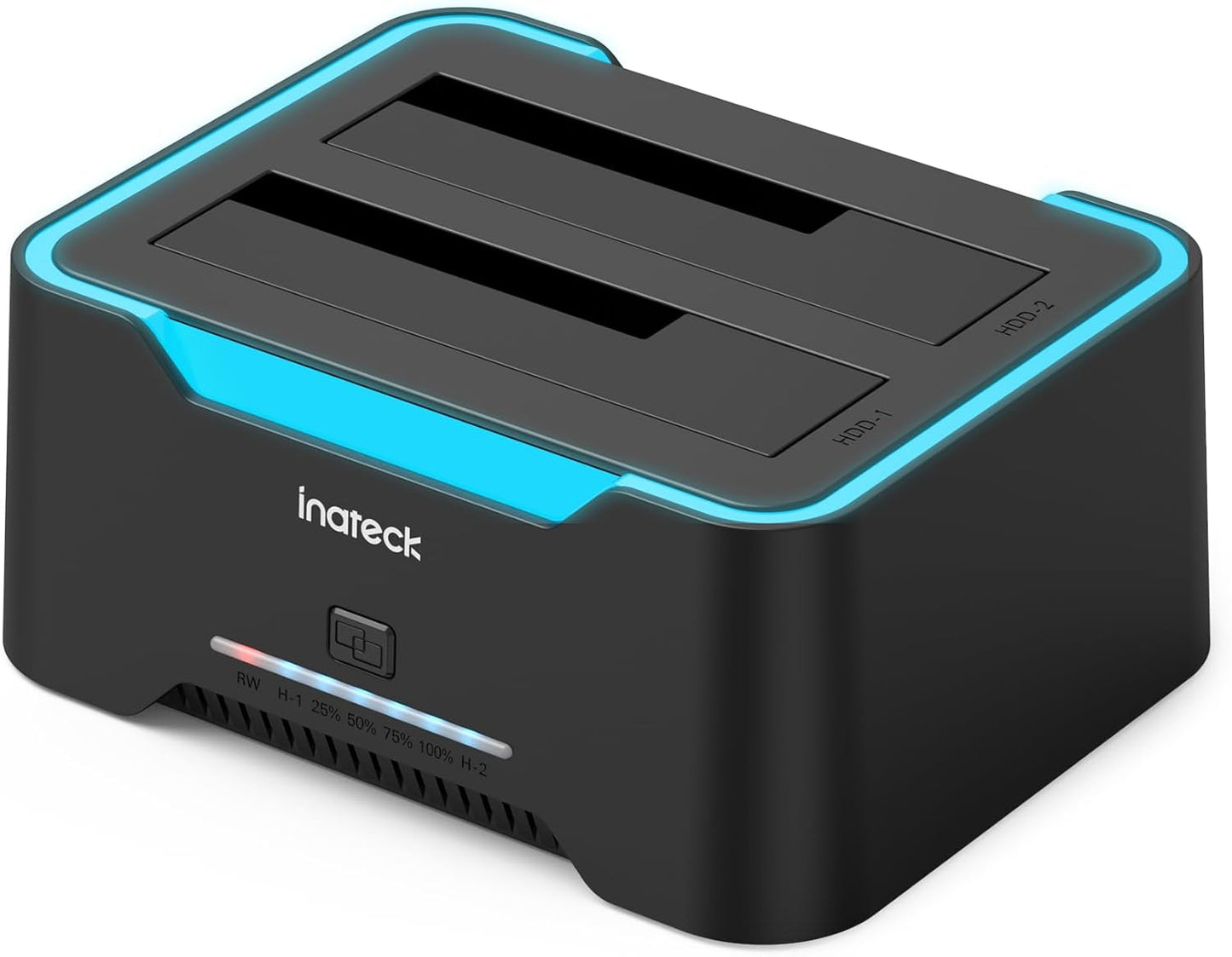
Our review looks at a practical desktop docking station that targets technicians, DIYers and anyone who moves data between drives regularly. The biggest reason to consider this unit is its combination of a dedicated offline cloning function and a USB 3.0 interface, which lets users copy drives without a PC while still keeping fast transfer capability for everyday file work. It is not a luxury enclosure but a straightforward tool for copying, testing and accessing 2.5 and 3.5 in SATA HDDs and SSDs.
Key Features
- Offline cloning: Clone a source disk to a larger target disk without a computer, simplifying backups and migrations.
- USB 3.0 speed: The JMS561U chipset and USB 3.0 interface provide high-speed data transfers up to 5Gbps and backward compatibility with USB 2.0 and 1.1.
- Smart RGB lighting: An RGB strip gives a breathing effect at idle and blinks during transfers, with a separate switch to disable the lighting if desired.
- Auto sleep mode: Drives enter sleep after 30 minutes of inactivity to save power and reduce wear.
- Wide compatibility: Works with Windows XP through Windows 11 and Mac OS 10.3 and later for basic read/write and cloning tasks.
Who It's For
This docking station is well suited to IT technicians, home lab users and photographers who move multiple drives and need to clone or access SATA drives quickly without permanent installation. The plug-and-play nature and cloning button make routine backups and disk upgrades more convenient.
It is less appropriate for users seeking a rugged portable enclosure or enterprise-class persistent RAID server. Buyers who require uninterrupted enterprise connectivity should verify drive stability for their specific drives, as some customers have reported mixed connectivity with certain models.
Pros & Cons
Pros
- Offline cloning capability lets users duplicate disks without a host computer.
- Fast transfers using a JMS561U chipset and USB 3.0 interface for up to 5Gbps throughput.
- Easy plug-and-play setup with a clear power indicator and user control over RGB lighting.
- Auto sleep mode conserves power and extends drive life when idle.
Cons
- Some users report intermittent drive connectivity with particular drives, so compatibility can vary by model.
- Not designed as a permanent enclosed drive; exposed slots may not suit rough environments.
Specifications
| Supported drive sizes | 2.5 in and 3.5 in SATA HDD and SSD |
| Interface to host | USB 3.0 (backward compatible with USB 2.0/1.1) |
| Max transmission speed | Up to 5Gbps |
| Clone function | Offline clone (HDD-1 source must be <= HDD-2 target) |
| Chipset | JMS561U |
| Auto sleep | 30 minutes idle |
| OS compatibility | Windows XP/7/8/10/11 and Mac OS 10.3+ |
Our Verdict
This docking station is a cost-effective tool for anyone who needs straightforward offline cloning and fast SATA access without installing drives internally. It offers good value for technicians and hobbyists, combining a reliable USB 3.0 connection, helpful power-saving behavior and simple operation, but buyers should check drive compatibility if they use uncommon or older drives.
Frequently Asked Questions
Can I clone drives without a computer?
Yes. The unit supports offline cloning from the source in slot HDD-1 to a larger or equal target in HDD-2 without a PC, provided the target is equal or larger capacity.
What speeds can I expect over USB?
It uses a JMS561U chipset with USB 3.0, so theoretical transfer rates reach up to 5Gbps; real-world speeds depend on the drives used.
Will it work with my Mac?
Yes. It is compatible with Mac OS 10.3 and later for drive access, while cloning and basic functions work across supported operating systems.
Editor's Take
This docking station is a practical, affordable tool for technicians and hobbyists who need fast USB 3.0 access and offline cloning for 2.5 and 3.5 in SATA drives; good value if drive compatibility is confirmed.

Recently viewed
Recently viewed products will appear here as customers browse the store.