

Satechi SM1 75% Mechanical Keyboard for Mac and Windows - Compact LED
Satechi SM1 75% Mechanical Keyboard for Mac and Windows - Compact LED
Price subject to change. Tap below for current.
Couldn't load pickup availability
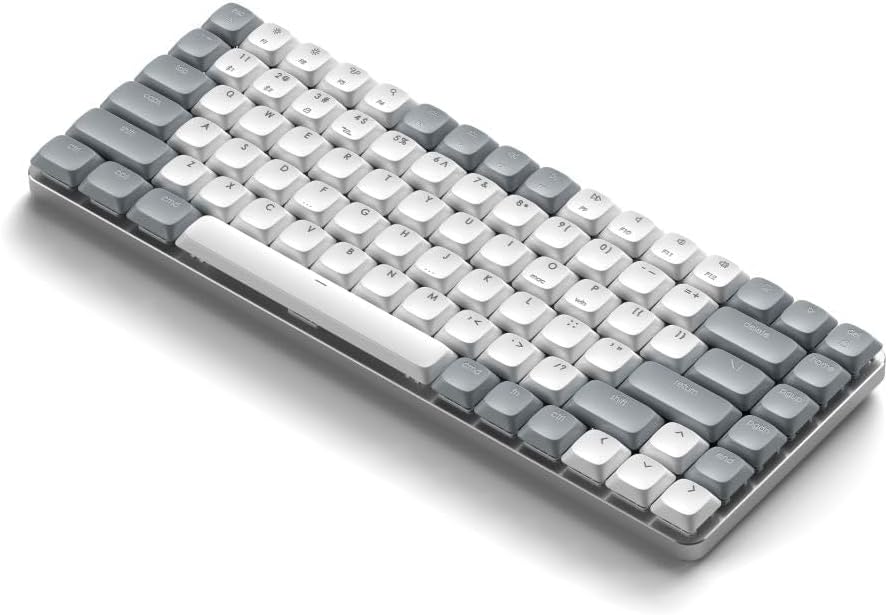
In this review the Satechi SM1 75% mechanical keyboard is presented as a compact option for users who need tactile feedback in a small footprint. The bottom line: it is best for Mac and Windows users who want a portable, rechargeable keyboard with low-profile brown switches and multi-device connectivity. The single biggest reason to buy is the combination of comfortable low-profile mechanical keys and the ability to switch between up to four devices quickly, making it a good fit for mixed-device workflows.
Key Features
- Multi-device pairing: Connect up to four devices and switch between them with simple FN shortcuts, which greatly streamlines working across Mac, iPad, Windows and Chromebook devices.
- Low-profile brown switches: The 84-key layout uses tactile low-profile brown switches that balance quiet typing and physical feedback for long typing sessions or gaming.
- LED backlight with patterns: Fourteen customizable lighting patterns and three brightness levels provide usable backlighting for low-light work and allow personal adjustment.
- Versatile connection modes: Use Bluetooth, a 2.4 GHz USB receiver, or wired mode via the included USB-C cable for reliable connectivity in different environments.
- Portable, rechargeable design: A built-in rechargeable battery with a flashing spacebar low-battery cue and detachable keycaps make the keyboard easy to maintain and carry.
- Mac and PC compatibility: Includes Windows-style keycaps and simple FN shortcuts to swap Mac and PC layouts, so switching platforms is straightforward.
Who It's For
The Satechi SM1 suits professionals, students, and gamers who need a compact 75% layout with mechanical feel and multi-device workflows. Its low-profile brown switches make it comfortable for long typing sessions, and the quick device switching is valuable for users who regularly move between a Mac, an iPad, and a Windows laptop.
Users who require fully programmable RGB, a numpad, or very bright backlighting should look elsewhere; the backlight receives mixed feedback and is tuned for subtle visibility rather than intense illumination. Also, people who need ultra-heavy-duty vibration-free stabilizers or hot-swappable switches should consider a different model with those specific features.
Pros & Cons
Pros
- Solid build and pleasing typing feel from the low-profile brown switches and stable keycaps.
- Flexible connectivity with Bluetooth, 2.4 GHz USB receiver, and wired mode covers most use cases.
- Portable, rechargeable design with adjustable feet and removable keycaps for easy transport and upkeep.
- Good Mac and Windows compatibility with included keycaps and simple layout switching.
Cons
- Backlighting brightness is mixed in user feedback and may be too dim for some environments.
- Functionality issues reported by a few users suggest occasional connectivity or double-press quirks for some units.
Specifications
| Model | Satechi SM1 75% (84 keys) |
| Switch type | Low-profile brown mechanical switches |
| Connectivity | Bluetooth (2 devices via FN 1/2), 2.4 GHz USB receiver (FN 3), Wired USB-C (FN 4) |
| Backlight | LED backlit, 14 patterns, 3 brightness levels |
| Included accessories | 2 Windows keycaps, 2 Alt keycaps, USB-C to USB-C cable (1.2m/3.2ft), 2.4 GHz USB receiver, manual |
| Compatibility | Mac, iPadOS/iOS, Windows, Chromebooks (FN shortcuts for OS switching) |
| Warranty | 2-year limited warranty |
Our Verdict
The Satechi SM1 75% mechanical keyboard is a compact, well-built option for mixed-device users who want tactile low-profile switches and flexible connectivity. It is good value for those who prioritize portability, Mac compatibility, and a restrained backlight; anyone needing brighter lighting or advanced programmability should compare alternatives.
Frequently Asked Questions
Can this keyboard switch between Mac and Windows layouts?
Yes. Hold FN + O for Mac/iPadOS/iOS and FN + P for PC, and it includes extra Windows keycaps to swap physical labeling.
How do you change backlight brightness and patterns?
Use F5 and F6 to adjust three brightness levels, cycle patterns with the lighting controls, and hold the light bulb key for 5 seconds to turn backlight on or off.
What comes in the box?
The package includes the keyboard, two Windows keycaps, two Alt keycaps, a USB-C to USB-C cable (1.2m/3.2ft), a 2.4 GHz USB receiver (attached to the keyboard bottom), and a user manual.
Editor's Take
The Satechi SM1 75% mechanical keyboard is a compact, well-built choice for mixed Mac and Windows users who want low-profile tactile switches, multi-device pairing, and portable rechargeable convenience; those seeking brighter backlighting or advanced programmability should compare alternatives.

Recently viewed
Recently viewed products will appear here as customers browse the store.