

Surface Pro Keyboard for 13 in Surface Pro 11/10/9/8/X - Backlit Type
Surface Pro Keyboard for 13 in Surface Pro 11/10/9/8/X - Backlit Type
Price subject to change. Tap below for current.
Couldn't load pickup availability
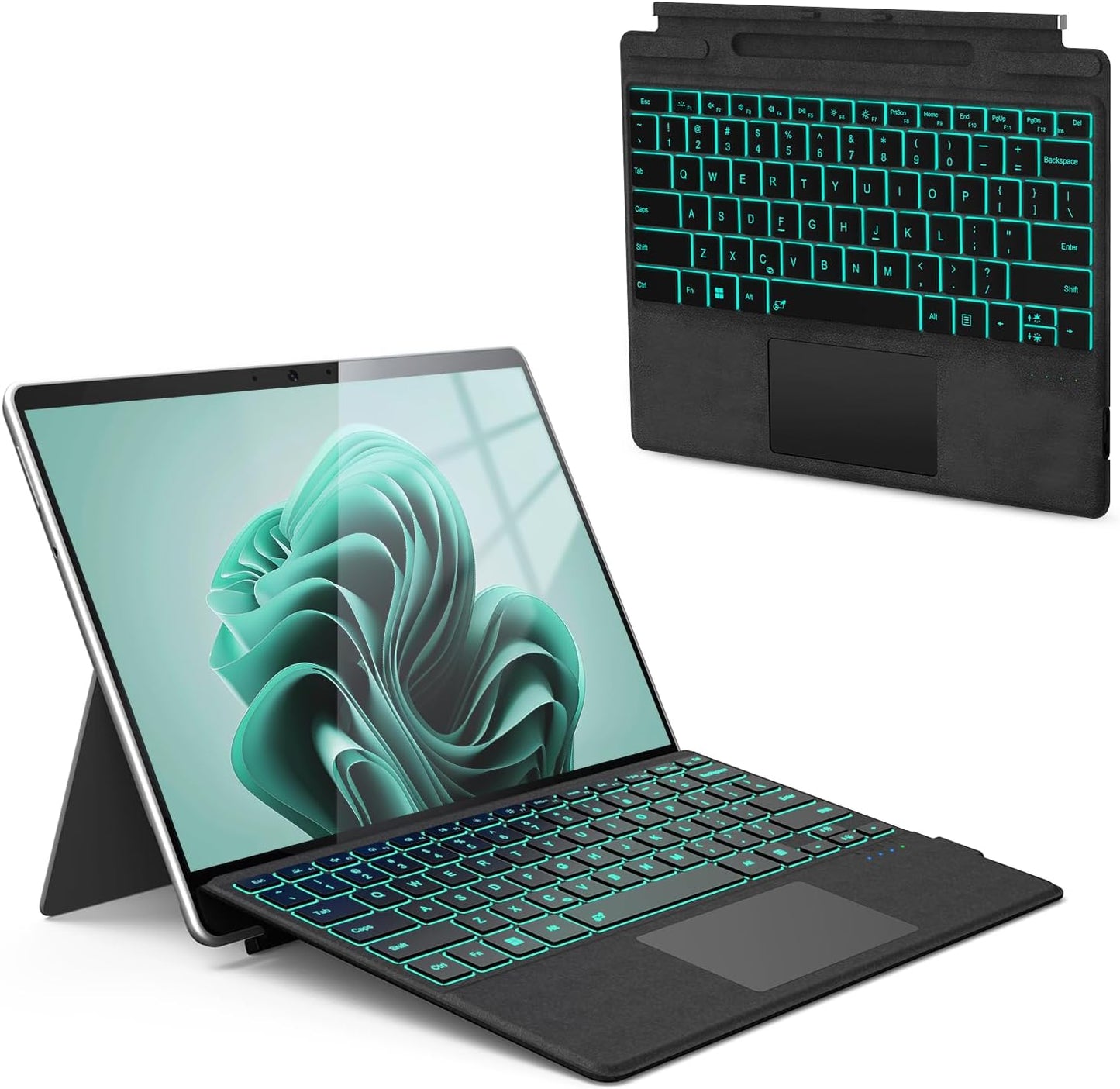
In this review of the Surface Pro Keyboard for the 13 in Surface Pro 11/10/9/8/X, the bottom line is simple: it is a compact, slim Bluetooth type cover that turns a Surface into a more laptop-like device for typing and light productivity. The biggest reason to buy is its combination of a full backlit keyboard and a large multi-gesture trackpad, which together create a comfortable typing experience and better cursor control without adding much bulk. The review covers real use, battery life behavior and the magnetic pen holder so readers can decide if it fits their Surface workflow.
Key Features
- Compatibility: Designed specifically for the 13 in Surface Pro 11, 10, 9, 8 and Surface Pro X models so the fit and magnetic attachment match those tablets.
- 7 Color Backlit: Seven LED backlight colors and three brightness levels let users work in low light and choose a color they find least distracting.
- Large Multi-Gesture Touchpad: The oversized trackpad supports up to four-finger gestures and a range of shortcuts for window switching and zooming, improving navigation compared with touch-only input.
- Two Angle Adjustment: Magnetic removable attachment provides two tilt angles when attached and allows separation up to 33 ft for flexible use modes.
- Ultra-Slim Bluetooth 5.3: Thin, light and portable, it connects via Bluetooth only and delivers a laptop-like typing feel while remaining easy to carry.
- Rechargeable Battery: Built-in 800 mAh battery charges by Type-C, supports long standby and allows use while charging for uninterrupted work.
Who It's For
This keyboard is best for Surface owners who want a lightweight, portable typing solution that preserves the tablet form factor while adding a full keyboard and improved trackpad. It is well suited to students, commuters and casual professionals who value a slim profile, backlighting and multi-gesture input.
Users who need a keyboard with pen charging, a proprietary connector, or wired-only reliability should look elsewhere. Also, anyone who requires compatibility with devices other than the listed 13 in Surface Pro models should confirm fit before buying.
Pros & Cons
Pros
- Comfortable, quiet typing with a slim, durable design that feels closer to a laptop keyboard than many third-party covers.
- Seven-color backlight with adjustable brightness makes working in dim environments easier and visually customizable.
- Large touchpad with multi-finger gestures and improved sensitivity speeds navigation and reduces reliance on the touchscreen.
- Long standby time and ability to use while charging provide practical battery flexibility for daily use.
Cons
- The pen holder is magnetic only and does not charge the pen, which is a limitation for users expecting pen charging in the cover.
- Bluetooth-only connection requires enabling Bluetooth in Surface settings and may not suit users who prefer a physical connector.
Specifications
| Compatible models | 13 in Surface Pro 11/10/9/8 and Surface Pro X (1st-3rd Gen) |
| Backlight | 7 color LED, 3 brightness levels |
| Touchpad | Large multi-gesture trackpad, supports up to 4-finger and 12 gestures |
| Connectivity | Bluetooth 5.3 only |
| Battery | 800 mAh rechargeable, Type-C charging, 60h use (backlight off) |
| Sleep | Auto sleep after 10 minutes inactivity, press any key to reconnect |
| Physical | Ultra-slim portable magnetic type cover with two angle adjustment |
Our Verdict
The Surface Pro Keyboard for 13 in Surface Pro models is a practical, value-oriented accessory that delivers a near-laptop typing experience, versatile trackpad gestures and useful backlighting in a slim package. It is a good buy for Surface users who need portability and improved input without extra bulk, though those who require pen charging or wired connection should consider alternatives.
Frequently Asked Questions
Will this keyboard charge the Surface Pen?
No, the magnetic pen holder only secures the pen and does not provide charging.
How long does the battery last?
The 800 mAh battery offers up to about 60 hours of continuous use with backlight off and supports use while charging via included Type-C cable.
How does it connect to the Surface?
The keyboard uses Bluetooth 5.3 and requires turning on Bluetooth in Surface settings and pairing the device labeled as a bluetooth keyboard.
Editor's Take
A practical, value-oriented keyboard that adds a near-laptop typing feel, large multi-gesture trackpad and backlighting to 13 in Surface Pro models; ideal for portable productivity though the pen holder does not charge the pen.

Recently viewed
Recently viewed products will appear here as customers browse the store.