

Thunderbolt 4 Docking Station USB C with 135W - Dual Display Ready
Thunderbolt 4 Docking Station USB C with 135W - Dual Display Ready
Price subject to change. Tap below for current.
Couldn't load pickup availability
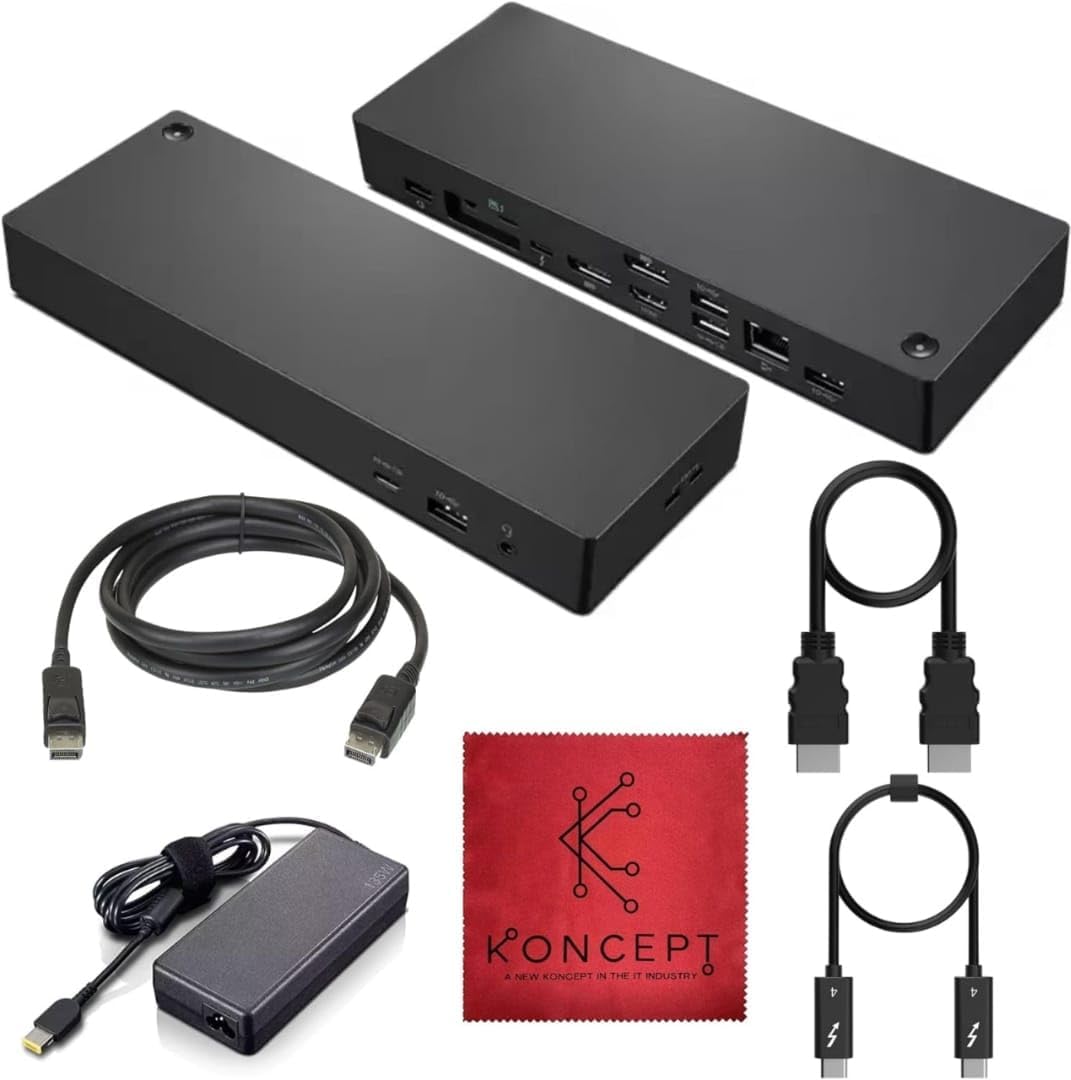
In this review the Thunderbolt 4 docking station is presented for professionals and power users who need a compact hub that can feed power and multiple displays from a single cable. The reviewer found the unit best suited to laptop users who want straightforward expansion without juggling adapters, because its combination of 135W power delivery and a mix of HDMI, DisplayPort and USB-C ports simplifies a multi-monitor setup and keeps a laptop charged during long work sessions.
Key Features
- Dynamic Connectivity: The dock provides a range of ports including USB-C, HDMI, and DisplayPort so users can connect external drives, monitors, and peripherals without repeated cable swaps.
- High Power Delivery: With robust 135W power support the dock can sustain a laptop and attached accessories through demanding tasks and extended workdays.
- Dual Display Capability: Support for two external monitors creates a flexible workspace for multitasking, editing, and productivity workflows.
- Universal Compatibility: The design is intended to work with a wide variety of laptops, making it a convenient choice for mixed-device environments.
- Single-Cable Convenience: Using a USB-C to C connection reduces clutter and makes docking and undocking a fast, repeatable action.
Who It's For
The dock is ideal for laptop owners who use their machine as a portable primary workstation and want desktop convenience at the office or home. Designers, developers, remote workers and frequent multi-taskers benefit from connecting two monitors and several peripherals through a single hub.
Those who primarily need only one external port, or who require brand-specific firmware features, may find this dock offers more capability than necessary and should evaluate simpler USB-C adapters or manufacturer docking solutions that match their laptop model exactly.
Pros & Cons
Pros
- Combines charging and data/video over one cable to reduce desktop clutter and speed transitions between work locations.
- Generous 135W power delivery keeps laptops and peripherals running during heavy use without frequent battery drain.
- Dual monitor support via HDMI and DisplayPort offers a flexible multi-display arrangement for productivity.
Cons
- Advanced or proprietary laptop features are not guaranteed since the dock is positioned for broad compatibility rather than model-specific integration.
Specifications
| Model | 40B00135US Thunderbolt 4 Docking Station |
| Power Delivery | 135W |
| Display Outputs | HDMI and DisplayPort (dual display capable) |
| Primary Ports | USB-C, HDMI, DisplayPort |
| Included Cables | USB-C to C cables |
| Compatibility | Universal laptop compatibility |
Our Verdict
The Thunderbolt 4 dock is a sensible choice for users who want reliable power delivery and flexible external display options without the clutter of multiple adapters. It represents good value for professionals who need consistent charging and dual-monitor capability from a single, easy-to-use hub.
Frequently Asked Questions
Will this dock charge my laptop?
Yes, the dock supports up to 135W power delivery to keep laptops and peripherals powered during extended use.
Can it run two external monitors?
Yes, it supports dual display output using the HDMI and DisplayPort connections for a multi-monitor workstation.
Is it compatible with all laptops?
The dock is designed for broad compatibility with USB-C and Thunderbolt-equipped laptops, but proprietary features from some manufacturers may not be supported.
Editor's Take
This Thunderbolt 4 docking station is a strong choice for professionals needing 135W power delivery and dual-display support; it simplifies multi-monitor setups and keeps laptops charged while offering broad compatibility.

Recently viewed
Recently viewed products will appear here as customers browse the store.