

TI-Nspire CX II CAS Color Graphing Calculator - Clear Color Display
TI-Nspire CX II CAS Color Graphing Calculator - Clear Color Display
Price subject to change. Tap below for current.
Couldn't load pickup availability
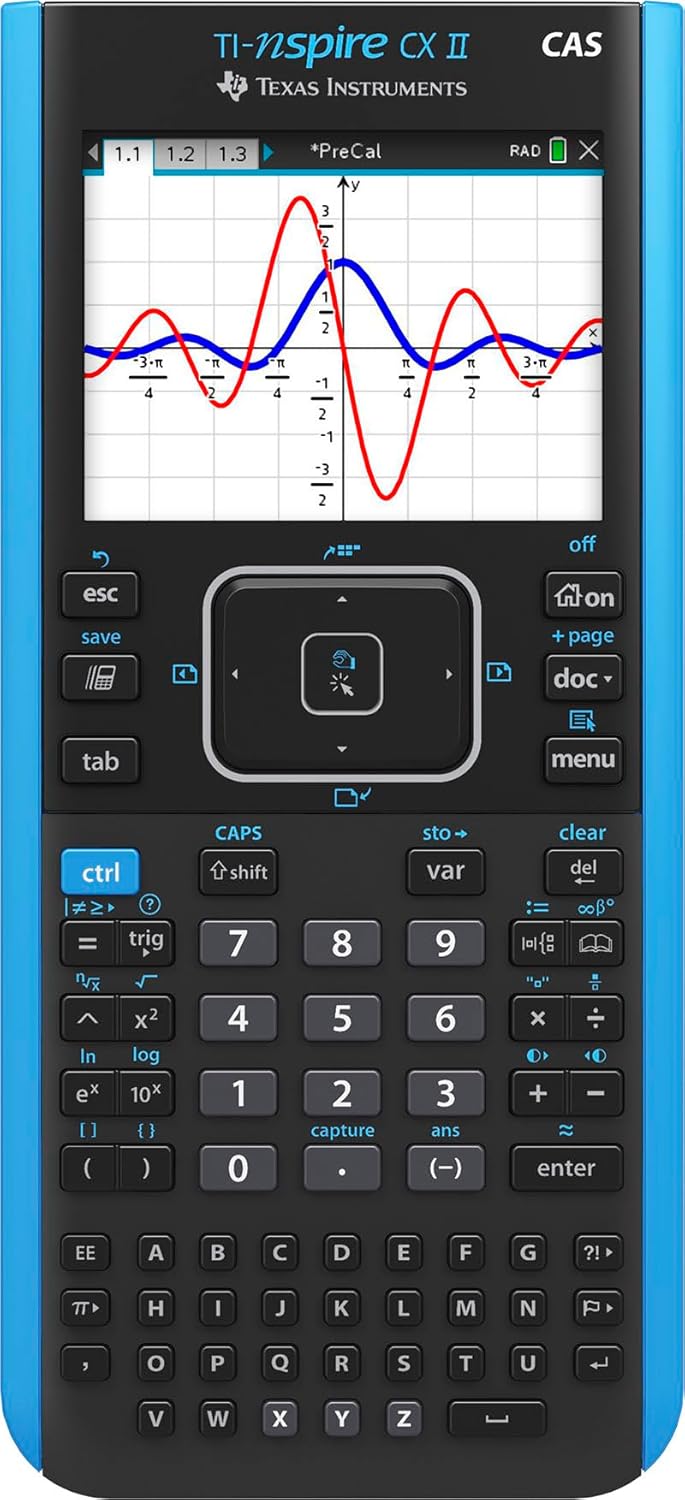
In this review of the TI-Nspire CX II CAS Color Graphing Calculator the bottom line is clear: this is a classroom-grade, feature-rich graphing calculator for high school and college students who need advanced symbolic math and vivid visuals. It stands out because of its bright color screen and the bundled TI-Nspire CX student software, which together make exploring functions, derivatives and parametric plots more interactive and easier to interpret than on monochrome models.
Key Features
- Color screen: The 3.5 in, 320 x 240 pixel display with 16-bit color makes graphs and annotations easier to distinguish at a glance.
- Rechargeable battery: A built-in rechargeable battery provides long runtime so users can rely on the calculator across several weeks of regular use without frequent swaps.
- Handheld-software bundle: The included TI-Nspire CX student software brings enhanced graphing and visualization to the desktop for lesson preparation and deeper exploration.
- Interactive plotting: Animated path plot and dynamic coefficient controls let students watch graphs draw in real time and see how equations change visually.
- Navigation and input: A thin, lightweight design with a clear touchpad and quick alpha keys reduces hand fatigue and speeds up common entry tasks.
- Graph customization: Six graph styles and 15 colors help separate multiple functions for clearer comparisons during study sessions.
Who It's For
The TI-Nspire CX II CAS is best suited for high school AP calculus, IB, and college engineering or science students who need symbolic algebra, calculus capabilities and high-quality on-device visuals. The calculator's CAS engine and software bundle are valuable when coursework requires manipulation of expressions, derivative calculations, or parametric/polar exploration.
Students who prefer a very simple, pocket-size calculator or who are uncomfortable with learning a feature-dense interface may find the learning curve steeper than with basic models; those users should consider a more minimalist graphing calculator without CAS functionality.
Pros & Cons
Pros
- Powerful CAS functionality supports algebraic manipulation and calculus tasks useful in advanced classes.
- Bright color display and multiple graph styles make complex plots easier to read and compare.
- Rechargeable battery and lightweight design improve portability and reduce running costs over time.
- Bundled student software expands classroom workflow by enabling desktop graphing and lesson preparation.
Cons
- The rich feature set and UI can feel unintuitive at first, so new users may face a learning curve.
- Advanced capabilities may exceed the needs of users who only require basic graphing or simple calculators.
Specifications
| Screen size | 3.5 in (320 x 240 pixels) |
| Screen color | 16-bit color, 15 selectable colors for graphs |
| Battery | Rechargeable battery included, lasts up to two weeks on a charge |
| Software | TI-Nspire CX Student Software (PC/Mac) included |
| Design | Thin, lightweight handheld with touchpad navigation and quick alpha keys |
| Graphing styles | Six graph styles and animated path plot |
Our Verdict
The TI-Nspire CX II CAS is a strong choice for students who need advanced symbolic math, clear visualizations and classroom software integration; its rechargeable battery and color screen add practical value. While it requires some time to master, the combination of CAS power and interactive plotting makes it a worthwhile investment for serious math and science coursework.
Frequently Asked Questions
Does it include software for PCs and Macs?
Yes, the TI-Nspire CX Student Software for PC and Mac is bundled with the calculator to extend graphing and lesson work to a computer.
How long does the battery last?
The rechargeable battery is designed to last up to two weeks of typical use on a single charge, reducing the need for replacements.
Is the display easy to read for multiple graphs?
Yes, the 16-bit color display, six graph styles and 15 color options make it easier to distinguish and compare multiple functions on screen.
Editor's Take
The TI-Nspire CX II CAS combines powerful symbolic math, a bright color screen and bundled desktop software to deliver strong value for advanced math and science students, though it has a modest learning curve.

Recently viewed
Recently viewed products will appear here as customers browse the store.