

Touch Keyboard Case for iPad Air 13 in and iPad Pro 12.9 in - Backlit
Touch Keyboard Case for iPad Air 13 in and iPad Pro 12.9 in - Backlit
Price subject to change. Tap below for current.
Couldn't load pickup availability
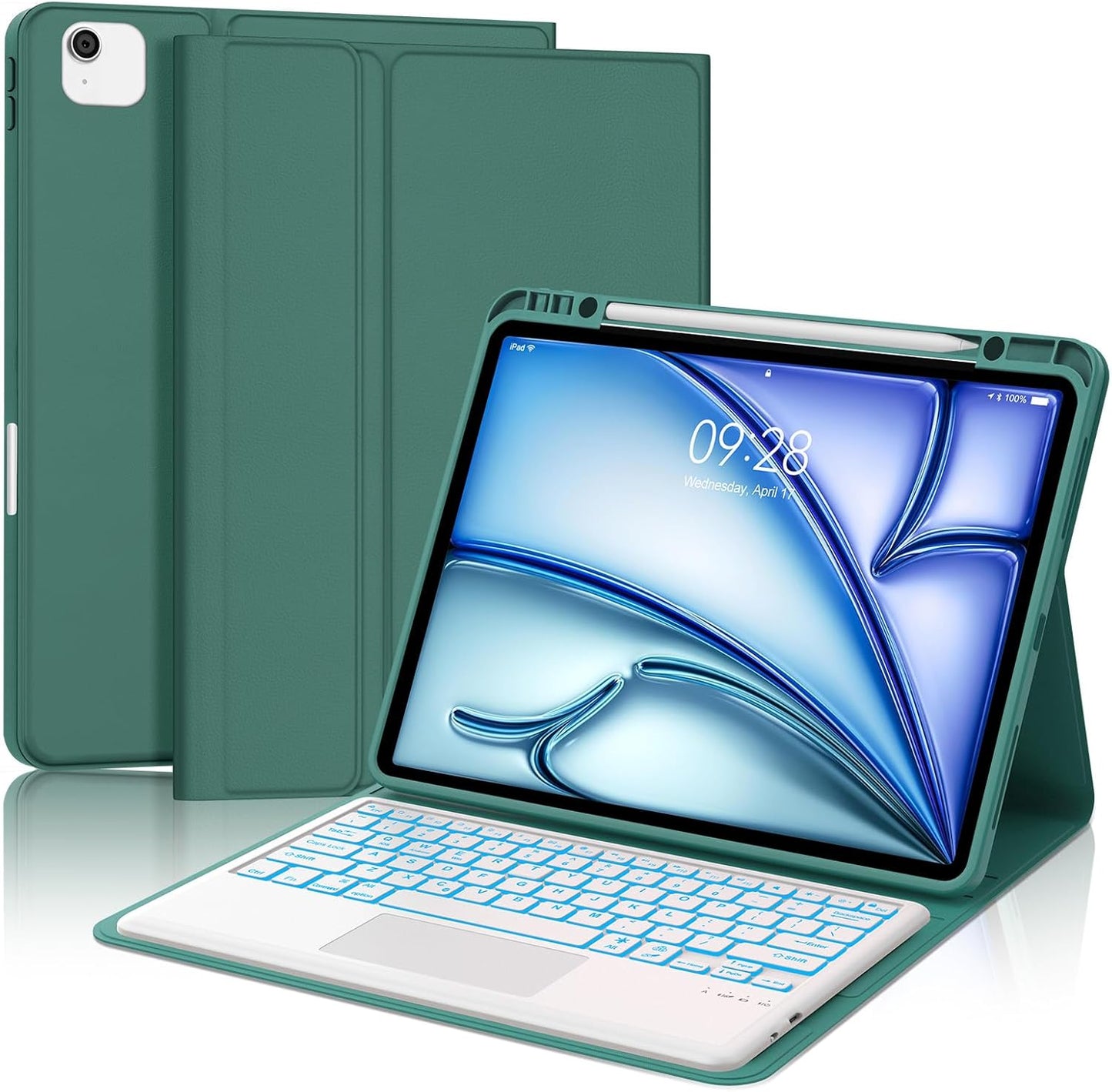
In this review the Touch Keyboard Case is evaluated as a productivity upgrade for iPad Air 13 and iPad Pro 12.9 owners who want laptop-like typing and pointer control. The review finds it most compelling for people who type often on their tablet and need a compact, rechargeable keyboard with a precision trackpad and pen storage. The biggest reason to buy is the combination of a responsive trackpad and a detachable, backlit keyboard that turns the tablet into a more capable workstation without adding excessive bulk.
Key Features
- Model compatibility: Designed specifically for iPad Air 13 (M3 2025, M2 2024) and iPad Pro 12.9 (3rd-6th gen), the case fits listed model numbers so users can confirm fit before buying.
- Precision trackpad: The built-in touchpad supports clicks, pinching, sliding and rolling, letting users navigate, edit documents and control the tablet with fingertip precision.
- Pencil storage and charging: The cover includes a stylus holder that supports Apple Pencil wireless charging while keeping the pen secure and available.
- Rechargeable long battery life: Fast charging fills the keyboard in about 2.5 hours and delivers up to 90 hours of continuous use with a standby around 90 days, reducing the need for frequent charging.
- 7-color backlight: Seven backlight colors with three brightness levels let users type comfortably in low light and customize the look of the keyboard.
- All-round protection: Soft PU leather outer and silicone inner shell with honeycomb padding provide drop, scratch and heat dissipation protection for day-to-day use.
Who It's For
The case is a strong choice for students, mobile professionals and creators who use an iPad Air 13 or iPad Pro 12.9 as a primary device and need a reliable keyboard and trackpad without buying a separate laptop. If you frequently edit documents, prepare presentations or browse with a cursor, the trackpad and shortcut keys make the iPad feel much more productive.
Users who should look elsewhere include owners of other iPad sizes or models not listed, and anyone who prefers a full-size mechanical keyboard feel; this is a slim, island-style keyboard tailored for portability rather than desktop typing ergonomics.
Pros & Cons
Pros
- Detachable Bluetooth keyboard with a precise multi-gesture trackpad improves tablet workflow.
- Integrated pen holder with wireless charging keeps the stylus secure and powered.
- Long battery life and quick charging minimize downtime during travel or long work sessions.
- Seven backlight colors and three brightness levels provide usable low-light typing.
Cons
- The slim island keys trade some tactile feedback compared with larger laptop keyboards, which may not suit heavy typists.
- Compatibility is limited to specific iPad Air 13 and Pro 12.9 generations, so you must confirm your model before purchasing.
Specifications
| Compatible models | iPad Air 13 (M3 2025, M2 2024); iPad Pro 12.9 3rd-6th gen |
| Keyboard style | Detachable Bluetooth island keyboard, 81 keys with shortcut keys |
| Trackpad | Precision touchpad supporting clicks, pinch, slide and roll |
| Backlight | 7 colors with 3 brightness levels |
| Battery | 2.5 hour charge; ~90 hours continuous use; ~90 days standby |
| Materials | PU leather cover with silicone inner shell and honeycomb padding |
| Special features | Pencil storage with wireless charging, auto wake/sleep |
Our Verdict
The Touch Keyboard Case is a practical value for iPad Air 13 and iPad Pro 12.9 owners who want a compact, rechargeable keyboard and a capable trackpad in one protective cover. It improves on-screen navigation and productivity while offering pen charging and solid protection, making it a worthwhile accessory for users who prioritize portability and integrated features over a desktop typing feel.
Frequently Asked Questions
Will this case fit my iPad model?
Confirm your iPad model number against the listed iPad Air 13 and iPad Pro 12.9 generations before ordering to ensure proper fit.
Does the pen charge while stored?
Yes, the case includes a stylus holder that supports wireless charging for compatible Apple Pens when properly seated.
How long does the keyboard battery last?
The keyboard takes about 2.5 hours to fully charge and offers roughly 90 hours of continuous use with an estimated 90 days of standby.
Editor's Take
A practical, portable keyboard case for iPad Air 13 and iPad Pro 12.9 that adds a precise trackpad, long battery life and pen charging, improving tablet productivity while keeping the device protected.

Recently viewed
Recently viewed products will appear here as customers browse the store.