

Triple Monitor USB-C Docking Station - Triple 4K 60Hz, 140W
Triple Monitor USB-C Docking Station - Triple 4K 60Hz, 140W
Price subject to change. Tap below for current.
Couldn't load pickup availability
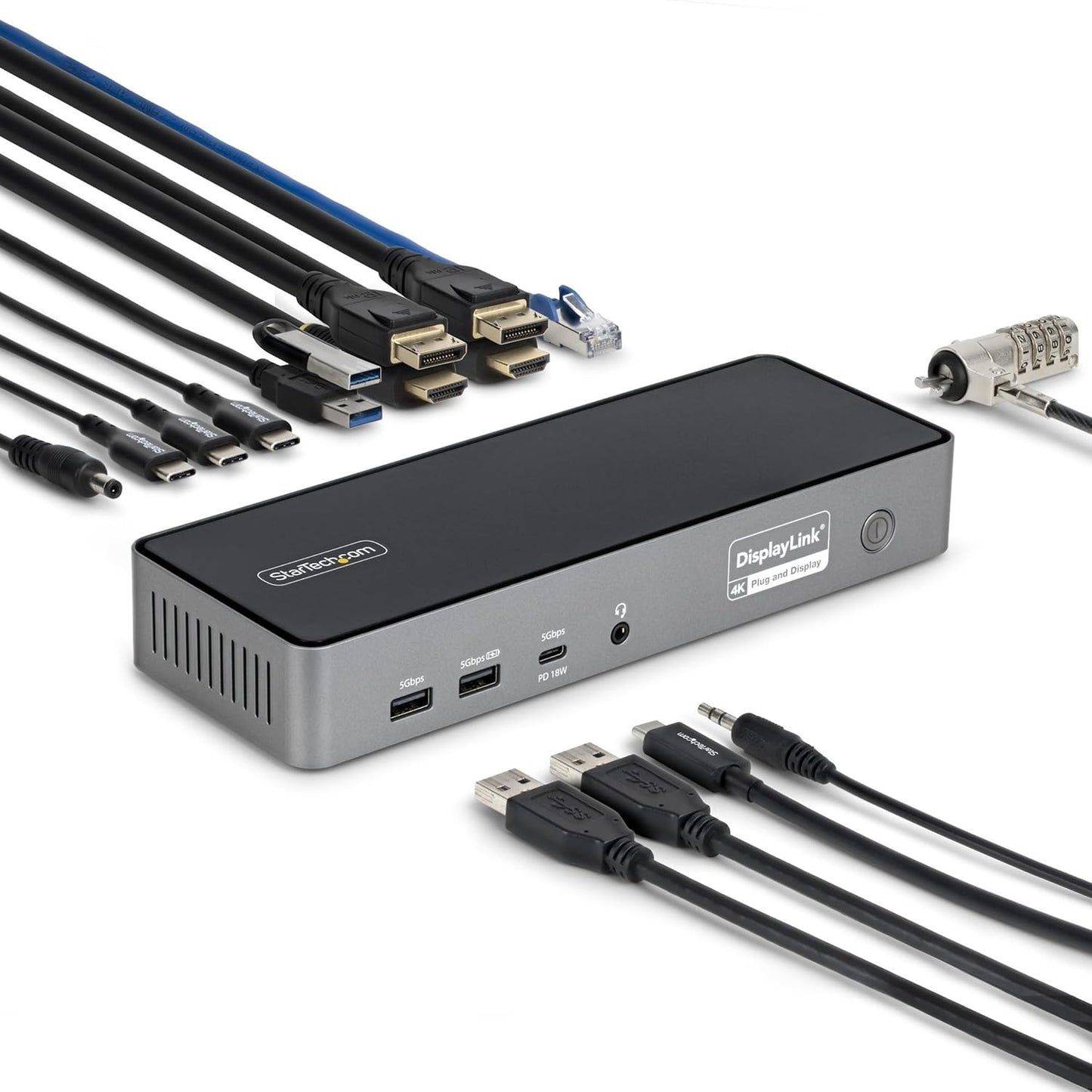
Our review of this triple monitor USB-C docking station finds it best suited for professionals who need multiple high-resolution displays and reliable laptop charging from a single hub. The single biggest reason to buy is its rare combination of native USB-C charging up to 140W while supporting up to three 4K 60Hz monitors, making it a practical choice for power-hungry laptops and mixed-device hot desk environments. The dock balances display flexibility, a 2.5GbE wired connection and security-minded mounting options in a form factor built for enterprise deployment.
Key Features
- Triple 4K 60Hz support: Drive up to three 4K 60Hz monitors from one dock to expand workspace and run multiple full-resolution applications simultaneously.
- 140W USB-C power delivery: Provides enough power to charge high-performance laptops while powering connected peripherals and displays.
- DisplayLink and USB-C video: Offers DisplayLink-based HDMI/DP outputs for broad compatibility while also supporting USB-C DP Alt Mode to use the laptop GPU for higher video performance when available.
- 2.5GbE networking: Built-in 2.5 Gigabit Ethernet supports faster transfers and cloud workflows, plus Jumbo Frame, PXE Boot and Wake-on-LAN for managed networks.
- Legacy compatibility: Includes a USB-A adapter to extend support to older systems with dual-display capability, simplifying shared workstation setups.
- Mounting and security: Lock slots and support for surface or VESA mounting keep the dock secured and out of the way in office or kiosk installations.
Who It's For
This dock is aimed at IT managers and power users running mixed fleets of macOS, Windows and ChromeOS devices who need consistent multi-monitor performance and centralized power delivery. It is especially useful in hot desk and hybrid office environments where quick reprovisioning and a unified driver experience reduce support time.
Users who need only single-monitor setups, or who rely exclusively on passive, non-powered USB hubs, should look elsewhere for a simpler, lower-cost solution. Gamers needing variable refresh rates beyond 60Hz or ultra-low-latency native GPU outputs for every monitor may prefer dedicated GPU outputs on their workstation.
Pros & Cons
Pros
- Supports three 4K 60Hz displays while delivering up to 140W of laptop charging for high-performance systems.
- 2.5GbE network connection offers faster file transfers and enterprise features like PXE Boot and Wake-on-LAN.
- Includes USB-A adapter for legacy host compatibility and offers both DisplayLink and USB-C DP Alt Mode video paths for flexibility.
- Secure mounting options and lock slots make it suitable for managed deployments and tidy workspaces.
Cons
- Triple-display capability relies on DisplayLink drivers for some platforms, which may add a driver step for IT provisioning.
- Mounting accessories are sold separately, so additional purchases are required for VESA installations.
Specifications
| Product Type | USB-C Docking Station |
| Display Support | Up to three 4K 60Hz monitors |
| Power Delivery | Up to 140W via USB-C |
| Network | 2.5GbE Ethernet (Jumbo Frames, PXE Boot, Wake-on-LAN) |
| Video Outputs | 2x HDMI and 2x DisplayPort with DisplayLink and USB-C DP Alt Mode support |
| Compatibility | macOS, Windows, ChromeOS (DisplayLink-based multi-monitor) |
| Security & Mounting | Built-in lock slots; surface or VESA mounting supported (mount sold separately) |
Our Verdict
The docking station is a strong choice for enterprise and power users who need robust multi-monitor support and high laptop charging capacity from one hub. Its combination of triple 4K 60Hz capability, 140W power delivery and 2.5GbE networking makes it good value for organizations deploying mixed devices and hot desks, provided IT is prepared to manage the DisplayLink driver where required.
Frequently Asked Questions
Will this dock charge my laptop?
Yes, it provides up to 140W of USB-C power delivery which is sufficient for most high-performance laptops that accept USB-C charging.
Can I use three monitors with a MacBook?
Yes, the dock supports triple 4K 60Hz monitors using DisplayLink-based outputs for macOS; USB-C DP Alt Mode is also available when the laptop GPU supports it.
Does it work on older PCs with only USB-A?
It includes a USB-A adapter for legacy host compatibility with dual-display support, though triple displays require a USB-C host or compatible DisplayLink setup.
Editor's Take
A strong choice for IT and power users who need triple 4K 60Hz displays, 140W USB-C charging and 2.5GbE networking in one enterprise-ready dock; requires DisplayLink driver management for some platforms.

Recently viewed
Recently viewed products will appear here as customers browse the store.