

Excel Dictionary 40 Excel Functions Mousepad 7in x 9in - Quick
Excel Dictionary 40 Excel Functions Mousepad 7in x 9in - Quick
Price subject to change. Tap below for current.
Couldn't load pickup availability
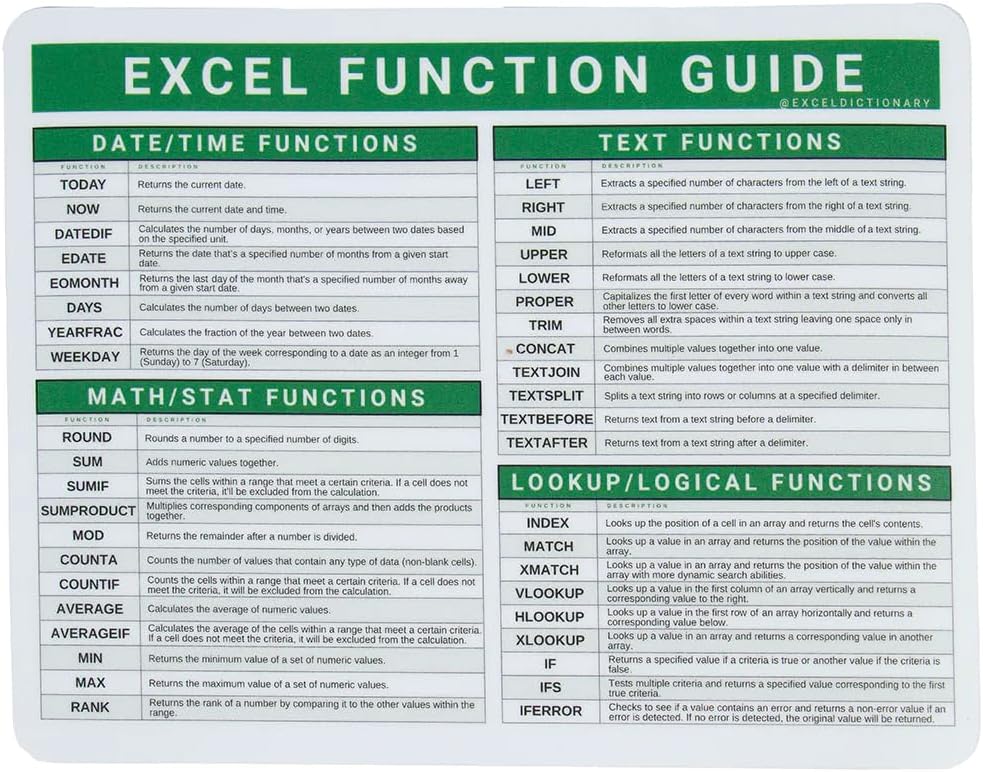
In this review the Excel Dictionary 40 Excel Functions Mousepad is evaluated for office users who want direct, visible access to common spreadsheet functions. The bottom line: this compact 7in x 9in mouse pad is aimed at learners and busy Excel users who benefit from a persistent, glanceable reference because it places over 40 function shortcuts within reach while you work. It is practical, low-cost, and designed to speed routine tasks without opening help menus or searching the web.
Key Features
- Over 40 functions: Offers a concise set of commonly used Excel functions printed on the surface so you can recall formulas quickly while building or auditing spreadsheets.
- Compact 7in x 9in size: Small footprint keeps your desk tidy and fits easily alongside a laptop or full-sized keyboard for everyday desktop use.
- For PC and MAC: Labels are intended for both Windows and macOS users so the pad works as a consistent visual aid across platforms.
- Learning aid: Each shortcut is clearly labeled to help beginners memorize functions as they work, turning repetitive reference into gradual learning.
- Giftable design: Practical packaging and a focused feature set make it a useful office gift for coworkers or students who use spreadsheets.
Who It's For
The mouse pad suits data entry clerks, analysts, students, and office workers who regularly use Excel and want a simple, always-visible reference for common functions. It is especially useful for people learning formulas who benefit from repeated exposure during normal workflow.
It is not aimed at power users who require an exhaustive list of shortcuts or large hotkey charts, nor at those who prefer full-size desk mats; if you need 80+ hotkeys or platform-specific macros, a larger, more detailed reference would be a better fit.
Pros & Cons
Pros
- Clear reference of over 40 functions reduces time spent searching for formula syntax.
- Compact 7in x 9in size fits most workspaces without crowding the mouse area.
- Cross-platform labeling supports both PC and MAC users in mixed environments.
Cons
- Contains around 40 functions only, so it omits many less-common shortcuts that power users might want.
Specifications
| Product name | Excel Dictionary 40 Microsoft Office Excel Functions Mousepad |
| Functions count | 40 |
| Size | 7in x 9in |
| Compatibility | PC and MAC |
| Primary use | Excel functions quick reference / mouse pad |
| Brand | Excel Dictionary |
Our Verdict
The Excel Dictionary 40 Functions Mousepad is a small, practical reference tool that delivers real value for learners and everyday spreadsheet users by keeping essential functions visible at the desk. It is best for those who want to build fluency without interrupting work, and it represents good value as an inexpensive, durable aid that reduces lookup time.
Frequently Asked Questions
Does this work for both Windows and Mac?
Yes, the pad is designed for use with PC and MAC and lists functions applicable across both platforms.
How large is the mouse pad?
The pad measures 7in x 9in, a compact size that fits alongside laptops and desktop keyboards.
Is this a complete list of Excel shortcuts?
No, it contains around 40 commonly used functions as a quick reference rather than an exhaustive shortcut chart.
Editor's Take
The Excel Dictionary 40 Functions Mousepad is a compact, practical quick-reference for learners and everyday Excel users, keeping over 40 common functions visible to speed up spreadsheet work and aid memorization.

Recently viewed
Recently viewed products will appear here as customers browse the store.