

Under Desk Cable Management Tray Extendable 15.7-29.1 in - No Drill
Under Desk Cable Management Tray Extendable 15.7-29.1 in - No Drill
Price subject to change. Tap below for current.
Couldn't load pickup availability
In this review of the Under Desk Cable Management Tray the bottom line is simple: it is a practical no-drill solution for anyone tired of tangled cords and exposed power strips. The tray's clip-on design and adjustable length make it especially useful for home offices, gaming desks, and shared workspaces where drilling is not an option. The reviewer found the metal construction and included accessories give this tray real utility for tidying multiple cables and small power bricks while protecting the desktop with an EVA pad.
Key Features
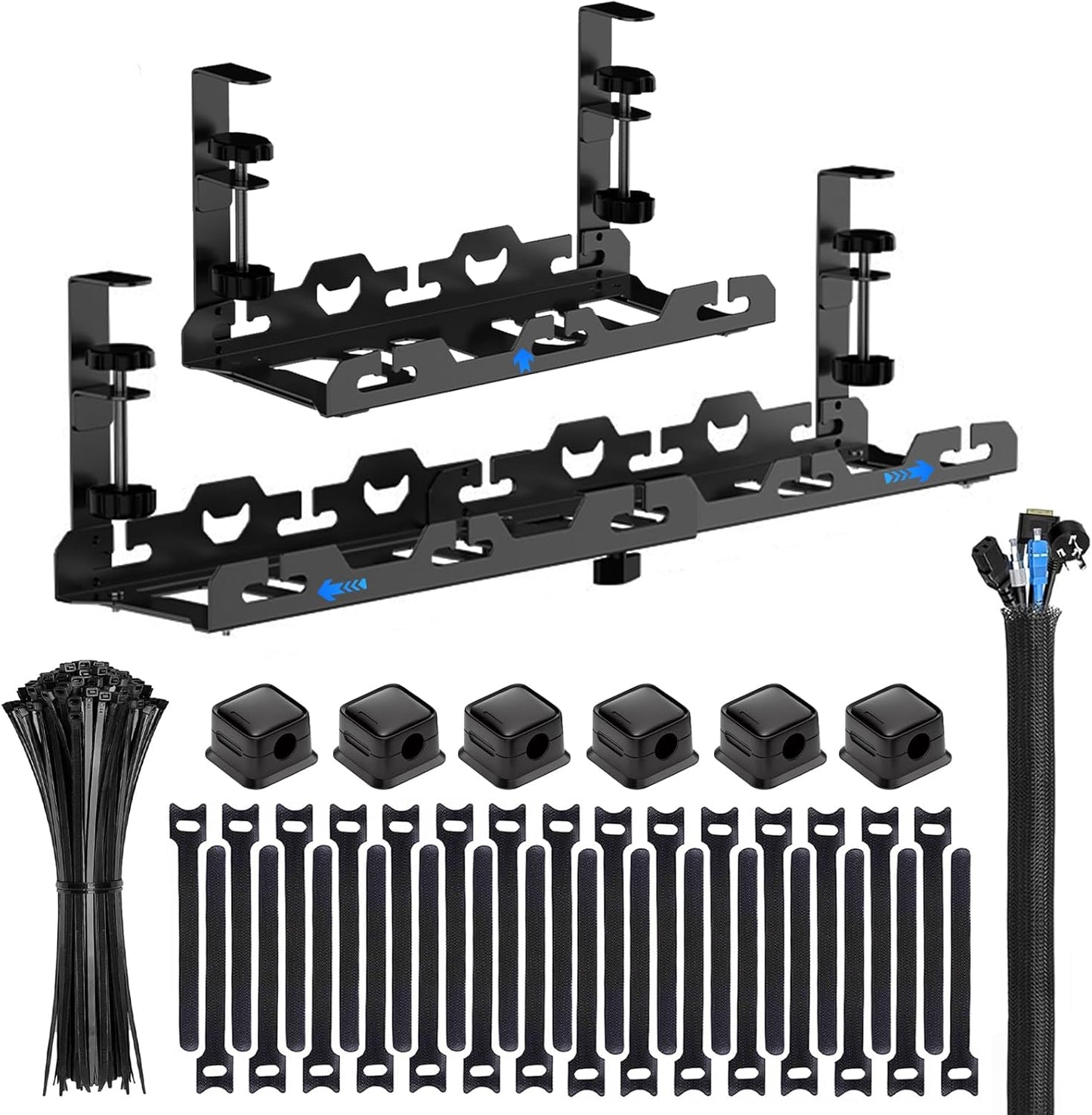
- No-drill clamp installation: The clip-on side clamps and hand-turn knob allow quick mounting without tools and avoid damaging the desk surface.
- Adjustable length: The extendable tray adjusts from 15.7 to 29.1 in so it fits narrow desks or wide tops and can hold larger power strips.
- Durable metal build: Carbon steel construction provides a sturdy platform for power strips, transformers, and cable bundles so the tray will not sag under normal loads.
- Ventilated mesh design: The open mesh reduces dust buildup and helps prevent heat buildup around power supplies and adapters.
- Accessory kit included: The package supplies a 10 ft braided cable sleeve, zip ties, reusable T-ties, and magnetic holders to secure and route cables neatly.
- Surface protection: EVA pads on the clamp faces protect the desk edge from marks during installation and everyday use.
Who It's For
This tray is ideal for people who need to organize multiple cords under a desk without altering their furniture, including renters, shared office users, and gamers who change their setup frequently. It is also a good option for home offices that require hiding power strips and USB hubs while keeping them accessible.
Those who need to hide extremely heavy equipment, or who require fully enclosed lockable cable boxes for security, should look elsewhere; this product is a ventilated open tray intended for cables, power bricks and small adapters rather than large server gear or high-security storage.
Pros & Cons
Pros
- Simple clamp-on installation that avoids drilling and keeps the desk surface intact.
- Expandable length fits a wide range of desk widths and larger power strips.
- Accessory kit makes initial cable routing easy and reduces the need to buy extra ties or sleeves.
Cons
- As an open mesh tray it does not fully conceal items visually and is not a lockable solution.
- May not be suitable for very heavy transformers or industrial equipment that exceed typical consumer loads.
Specifications
| Brand | COCIVIVRE |
| Installation | No-drill clip-on clamp |
| Length (adjustable) | 15.7 in to 29.1 in |
| Material | Carbon steel mesh |
| Included accessories | 10 ft braided sleeve, 30 zip ties, 30 T-ties, 6 magnetic holders |
| Surface protection | EVA scratch-resistant pad |
Our Verdict
The Under Desk Cable Management Tray is a solid, value-oriented solution for keeping cords, power strips, and small adapters organized without drilling into furniture. Renters and flexible workspace users will appreciate the clamp install and accessories, while the metal mesh keeps items ventilated and supported. It is good value for most home and office cable cleanup needs.
Frequently Asked Questions
Can this be installed without tools?
Yes, the tray uses hand-turn knobs and side clamps so no drill or screwdriver is required.
Will it fit a wide desk?
The extendable design adjusts from 15.7 to 29.1 in to accommodate a variety of desk widths.
Are large power bricks supported?
The metal mesh supports common power bricks and adapters, but extremely heavy or oversized equipment may exceed recommended use.
Editor's Take
The extendable under desk cable management tray is a practical no-drill solution that organizes power strips and adapters with a sturdy metal mesh and useful accessory kit, offering good value for home and office setups.

Recently viewed
Recently viewed products will appear here as customers browse the store.