

USB-C and Thunderbolt Dock - Dual 4K, 100W Charging
USB-C and Thunderbolt Dock - Dual 4K, 100W Charging
Price subject to change. Tap below for current.
Couldn't load pickup availability
In this review the Kensington USB-C and Thunderbolt Dock proves itself as a solid universal docking option for users who need extensive ports and strong charging capability. The biggest reason to consider this dock is its combination of up to 100W laptop charging and support for dual 4K displays via HDMI 2.0 and the Thunderbolt 3 downstream port, making it a practical single solution for Windows laptops, MacBooks with compatible silicon, and supported Surface devices. It works without drivers and gives a straightforward way to consolidate peripherals and networking at a desk.
Key Features
- Up to 100W charging: The included 170 Watt power supply delivers up to 100W power to charge Thunderbolt 3, Thunderbolt 4 and USB4 laptops while also powering peripherals.
- Dual 4K video support: Connect one or two external displays at up to 4096 x 2160 via the HDMI 2.0 port and the Thunderbolt 3 downstream port for high-resolution workflows.
- Hybrid compatibility: Works across Windows and macOS with Thunderbolt 3 or USB-C computers and supports Microsoft Surface 9 and Surface Laptop 5 for broad device coverage.
- High-speed data: Thunderbolt connectivity supports fast data transfers and the dock includes multiple USB-C and USB-A ports for drives and accessories.
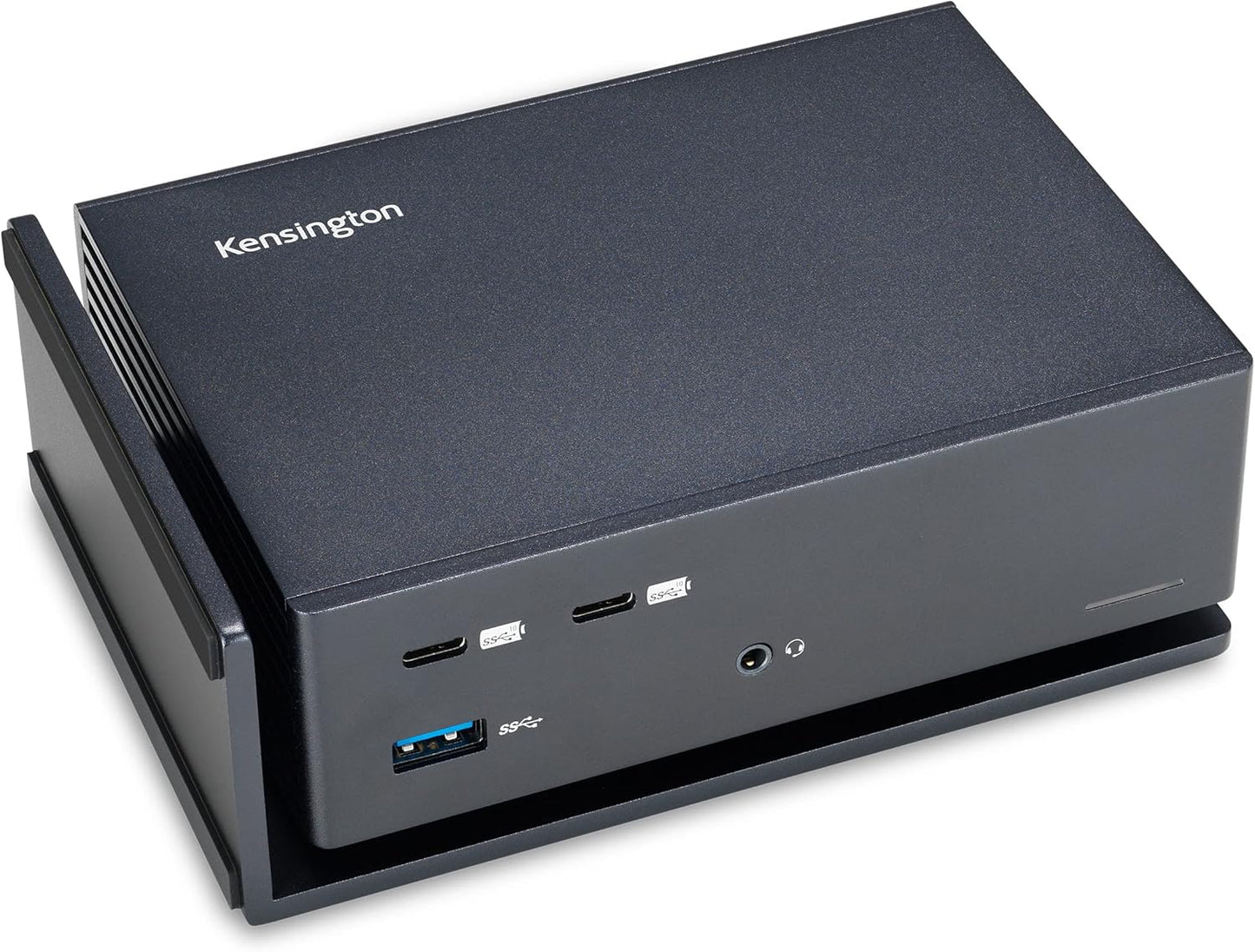
- Flexible placement: The dock can sit horizontally or vertically to fit different desk setups and keep cables organized.
Who It's For
The Kensington dock is best for professionals and students who need a clean desk setup and want to connect multiple peripherals, external monitors and wired Ethernet with a single cable. It suits owners of Thunderbolt 3/4 and USB-C laptops who need reliable charging up to 100W and a broad port selection for drives, audio and network access.
Users with original M1 MacBook Air or 13 MacBook Pro should look elsewhere if they require true dual external displays, since those M1 chipsets are limited to a single external monitor. If you require adapter cables for specific monitor connections, budget for USB-C to HDMI or DisplayPort cables as they are not included.
Pros & Cons
Pros
- Comprehensive port selection including two front USB-C ports and four USB-A ports for legacy and modern accessories.
- Strong power delivery up to 100W keeps most laptops charged while powering external drives and phones.
- Reliable build and stable connectivity that customers note rivals more expensive alternatives.
Cons
- Some users report mixed experience with the power supply noise level, so a few units may be louder than expected.
- Adapter or cable for the Thunderbolt downstream video (USB-C to HDMI/DisplayPort) is required but not included.
Specifications
| Dock type | USB-C and Thunderbolt 3 hybrid dock |
| Power delivery | Up to 100W using included 170 Watt power supply |
| Display outputs | HDMI 2.0 port and Thunderbolt 3 downstream port (dual 4K supported) |
| USB ports | Two front USB-C 3.2 Gen2, four USB-A (mix of Gen1 and Gen2) |
| Ethernet | Gigabit Ethernet port |
| Audio | Audio combo jack |
| Included cable | 0.8 m Intel Certified Thunderbolt 3 cable |
Our Verdict
The Kensington USB-C and Thunderbolt Dock is a practical, well-built docking station that delivers extensive connectivity and robust power delivery for most Thunderbolt 3/4 and USB-C laptops. It represents good value for users who need dual 4K support and multiple ports, though owners of original M1 13 MacBook models should note display limits. Overall it is a dependable desktop hub for mixed Windows and Mac environments.
Frequently Asked Questions
Will this dock charge my laptop?
Yes, the included power supply delivers up to 100W power delivery compatible with Thunderbolt 3, Thunderbolt 4 and USB4 laptops.
Can I run two external 4K monitors?
Yes for Thunderbolt-capable hosts the dock supports dual 4K via HDMI 2.0 and the Thunderbolt 3 downstream port; original M1 13 MacBook models are limited to a single external display by Apple chipset restrictions.
Are video cables included?
A 0.8 m Thunderbolt 3 cable is included for host connection, but adapters or cables for the downstream video port (USB-C to HDMI or DisplayPort) are not included.
Editor's Take
The Kensington USB-C and Thunderbolt Dock is a reliable, well-built hub delivering up to 100W charging and dual 4K display support for most Thunderbolt 3/USB-C laptops, offering strong value for mixed Windows and Mac setups.

Recently viewed
Recently viewed products will appear here as customers browse the store.