

USB C and USB 3.0 Universal Laptop Docking Station - Dual 4K
USB C and USB 3.0 Universal Laptop Docking Station - Dual 4K
Price subject to change. Tap below for current.
Couldn't load pickup availability
In this review the WAVLINK USB 3.0 and USB-C Universal Laptop Docking Station is evaluated for people who need a compact way to expand a laptop into a full workstation. The bottom line: this dock is best for users who want reliable multi-monitor support and broad peripheral connectivity without juggling multiple adapters. It uses DisplayLink graphics technology (driver required) to deliver up to dual 4K@60Hz displays, and includes power delivery so a single connection can feed the laptop and several devices. For day-to-day productivity and mixed Windows/Mac use it is a practical, well-rounded option.
Key Features
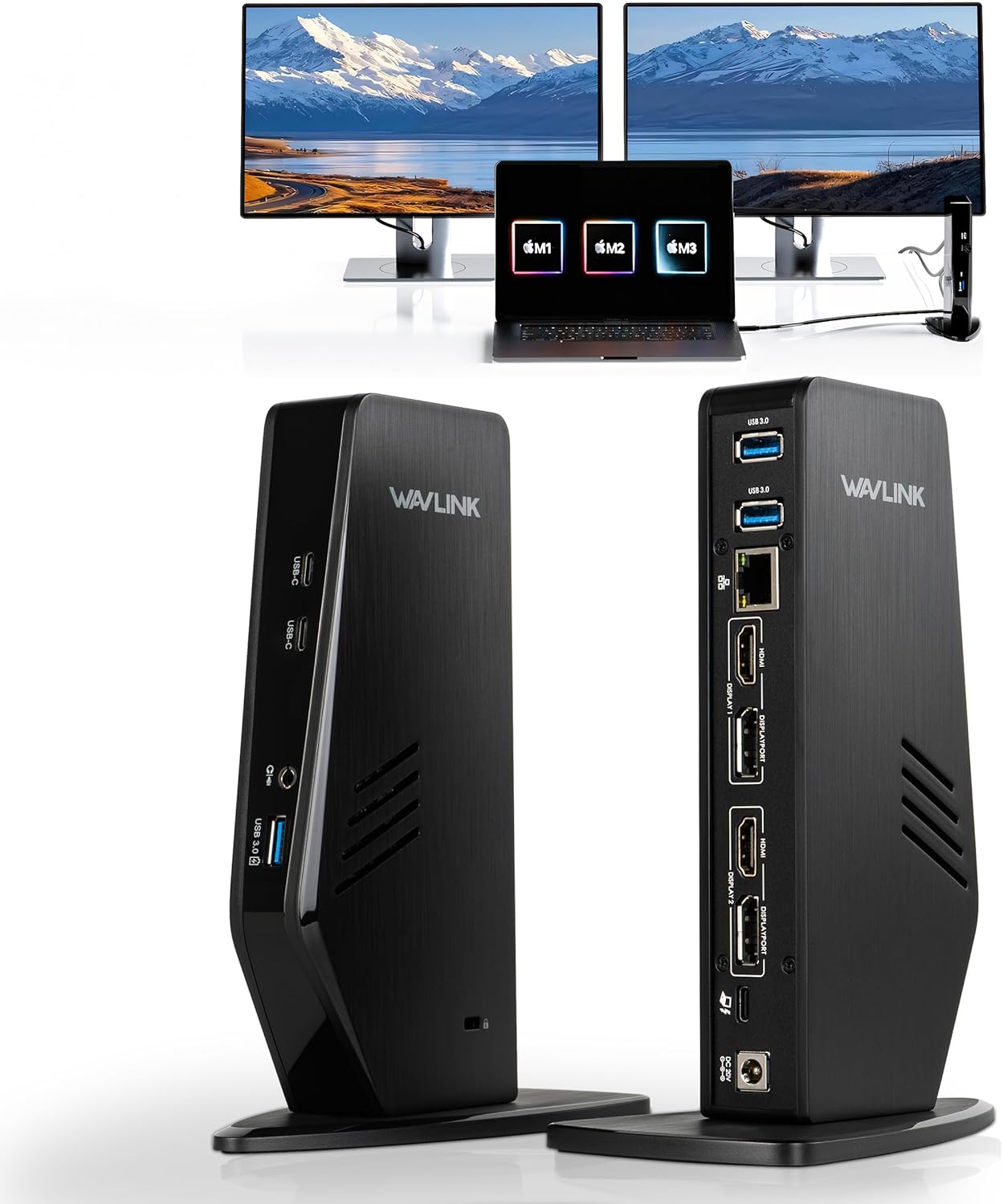
- 13-in-1 expansion: One connection turns a laptop into a 13-port hub so users can attach multiple displays, USB drives, wired network and audio without extra dongles.
- Dual monitor support: The dock supports single 5K@60Hz or dual 4K@60Hz displays when monitors and cables also support those modes, improving multitasking and screen real estate.
- Power delivery: Up to 65W PD to the host laptop plus 35W available from a USB-A port for charging phones or tablets reduces the need for separate chargers on the desk.
- Broad connectivity: Two HDMI, two DisplayPort, three USB-A 3.0, two USB-C 3.1, Gigabit Ethernet and audio I/O cover most peripherals for office, conference or home setups.
- Cross-platform compatibility: Works with Type-C and Type-A laptops and supports macOS (M1/M2/M3 guidance provided), Windows, ChromeOS and Android, making it flexible for mixed-device environments.
Who It's For
This docking station is aimed at professionals and remote workers who need a clean desk setup and reliable dual-display output for spreadsheets, web productivity and conference calls. It is also useful for Mac users with M-series machines who need multi-display support via DisplayLink with the appropriate driver and macOS permissions.
It is less suited to users who need the dock for high-end gaming or intensive 2D/3D graphics work, since DisplayLink is primarily tuned for productivity and streaming desktops rather than GPU-accelerated gaming. Buyers should also confirm their laptop supports Type-C charging to take full advantage of the 65W PD capability.
Pros & Cons
Pros
- Very wide I/O coverage with dual HDMI and dual DisplayPort for flexible monitor layouts.
- Supports single 5K or dual 4K@60Hz when paired with compatible monitors and cables.
- Includes a 100W power adapter and provides laptop PD plus an extra 35W on a USB-A port for device charging.
- Compatible with both Type-A and Type-C hosts and offers macOS guidance for M-series machines.
Cons
- Requires DisplayLink driver installation and macOS security permissions, which may add setup steps for some users.
- Not recommended as a primary solution for demanding gaming or professional GPU-heavy graphics work.
Specifications
| Ports | 2 HDMI, 2 DisplayPort, 3 USB-A 3.0, 2 USB-C 3.1, Gigabit Ethernet, Audio I/O |
| Display support | Single 5K@60Hz or dual 4K@60Hz (with compatible monitors and cables) |
| Power delivery | Up to 65W to laptop; USB-A port supplies up to 35W for downstream charging |
| Technology | DisplayLink USB graphics (driver required) |
| Compatibility | Type-C and Type-A laptops; macOS M1/M2/M3 guidance; Windows, ChromeOS, Android support |
| In the box | Docking station, 100W power adapter, USB-C to C cable, USB-C to A cable, manual |
Our Verdict
The WAVLINK Universal Docking Station is a practical, value-focused dock for professionals who need multi-monitor setups and broad peripheral connectivity. Its support for dual 4K displays, onboard charging and extensive port selection make it a strong choice for office or home productivity. Users comfortable installing DisplayLink drivers and not focused on high-end gaming will find it especially useful as a single-cable workstation solution.
Frequently Asked Questions
Do I need any drivers?
Yes, the dock uses DisplayLink technology so the appropriate DisplayLink driver must be installed on the host system for multi-display output.
Will it charge my laptop?
It provides up to 65W power delivery to the laptop when the host supports Type-C charging, reducing the need for a separate laptop adapter.
Can I use dual 4K@60Hz monitors?
Yes, the dock supports dual 4K@60Hz but each monitor and its cable must support the desired resolution and refresh rate.
Editor's Take
The WAVLINK docking station is a value-packed workstation hub that supports single 5K or dual 4K@60Hz, provides up to 65W PD and wide I/O, making it ideal for productivity-focused users who can install DisplayLink drivers.

Recently viewed
Recently viewed products will appear here as customers browse the store.