

USB C Docking Station Dual Monitor - 11 in 1 Triple Display Hub
USB C Docking Station Dual Monitor - 11 in 1 Triple Display Hub
Price subject to change. Tap below for current.
Couldn't load pickup availability
In this review of the USB C Docking Station Dual Monitor, the focus is practical productivity: this hub is for users who need to connect multiple external displays and a variety of peripherals without carrying a pile of adapters. The single biggest reason to buy is the rare triple display capability from one USB-C connection, letting Windows and many USB-C laptops drive three monitors or two 4K displays while adding Ethernet, SD/TF slots and multiple USB ports for a tidy desktop setup.
Key Features
- Triple monitor support: Offers single or dual 4K HDMI at 3840x2160@30Hz and triple monitor mode up to 1920x1080@60Hz to expand screen real estate for multitasking.
- Compact aluminum design: Rolled aluminum construction keeps the hub lightweight and durable for travel and a minimal desk footprint.
- 100W PD charging: USB-C power delivery up to 100W enables faster charging for compatible laptops while the hub is in use.
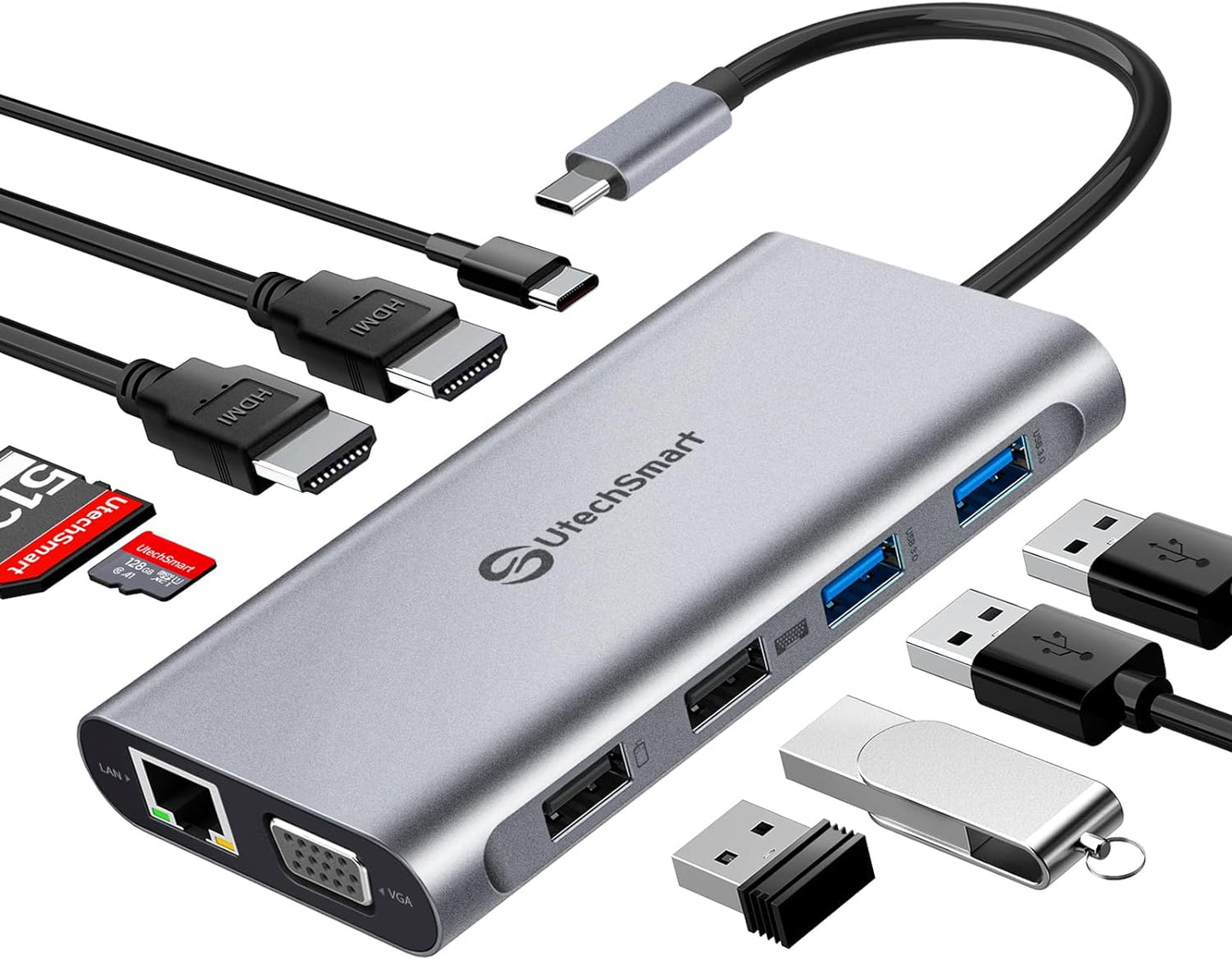
- Full port set: Two HDMI, one VGA, Gigabit Ethernet, SD and TF card slots and four USB ports provide broad connectivity for displays, storage and peripherals.
- Fast data and networking: Two USB 3.0 ports at 5Gbps and a 1000M Ethernet port deliver quick file transfers and lower latency for streaming or online work.
- Smart safety chip: Built-in protections guard against overloads, short circuits and overheating during charging and data transfers.
Who It's For
The docking station suits professionals and power users who need multiple external displays plus wired Ethernet and card access from a single USB-C or Thunderbolt port, especially owners of Windows laptops that support DisplayPort Alt Mode. It is also useful for content creators who move between a studio and remote workspaces and want a compact, all-in-one hub.
Users who rely on macOS extended display modes should be cautious: the hub does not support extend mode for macOS when driving triple displays, and Apple users who require three independent high-resolution monitors should look for a macOS-specific solution or separate adapters.
Pros & Cons
Pros
- Supports triple displays up to 1080p@60Hz and dual 4K outputs for flexible multi-monitor setups.
- Wide array of ports including Gigabit Ethernet and SD/TF slots removes need for extra adapters.
- Compact, rolled aluminum housing is portable and durable for frequent travel.
- Fast USB 3.0 data rates and 100W PD charging speed make it a capable workstation companion.
Cons
- Triple display mode is limited to 1920x1080@60Hz and does not support macOS extend mode for three external monitors.
- Although it supports PD charging, the hub notes it cannot provide power for every laptop in every configuration.
Specifications
| Model type | 11 in 1 USB C Docking Station |
| Display outputs | 2x HDMI 4K and 1x VGA (dual 4K@30Hz or triple 1080p@60Hz) |
| Power delivery | USB-C PD up to 100W (PD3.0) |
| USB ports | 2x USB 3.0 (5Gbps) and 2x USB 2.0 |
| Network | Gigabit Ethernet (1000M) |
| Card slots | SD and TF card slots |
| Compatibility | Laptops with USB-C/Thunderbolt supporting DisplayPort Alt Mode; Windows and Chrome OS friendly |
Our Verdict
The USB C Docking Station Dual Monitor is a practical, value-oriented hub for users who need multiple displays and a full complement of ports in a compact package. Its triple display capability, fast USB 3.0 ports, gigabit Ethernet and 100W PD charging make it a strong choice for Windows laptop users and travelers who want to consolidate adapters, though macOS users with advanced multi-monitor needs should confirm compatibility first.
Frequently Asked Questions
Will this hub charge my laptop?
The hub supports USB-C PD up to 100W for faster charging, but some laptops may require direct OEM chargers for full power delivery in all modes.
Can I run three independent monitors on a MacBook?
Triple monitor mode works, but the hub does not support macOS extend mode for three independent displays; macOS users should check their laptop's multi-monitor support.
Does it need drivers?
It is plug-and-play for most systems that support DisplayPort Alt Mode, though specific peripherals may require drivers from their manufacturers.
Editor's Take
A compact 11-in-1 USB C docking station that expands productivity with dual 4K or triple 1080p displays, fast USB 3.0, Gigabit Ethernet and 100W PD charging; ideal for Windows laptop users who need a portable, full-featured hub.

Recently viewed
Recently viewed products will appear here as customers browse the store.