

USB C Docking Station Laptop Hub Dual Monitor - 13-in-1 Multiport Dock
USB C Docking Station Laptop Hub Dual Monitor - 13-in-1 Multiport Dock
Price subject to change. Tap below for current.
Couldn't load pickup availability
In this review the USB C Docking Station Laptop Hub Dual Monitor is presented as a practical expansion dock for users who need to connect multiple displays and peripherals to a modern USB-C or Thunderbolt laptop. The bottom line: this 13-in-1 dock is aimed at professionals and power users who want a single plug-and-play adapter that supports dual 4K outputs plus a DisplayPort, Gigabit Ethernet and plentiful USB ports, and the biggest reason to buy is its ability to drive up to three external monitors on Windows while also providing PD charging and fast data transfer.
Key Features
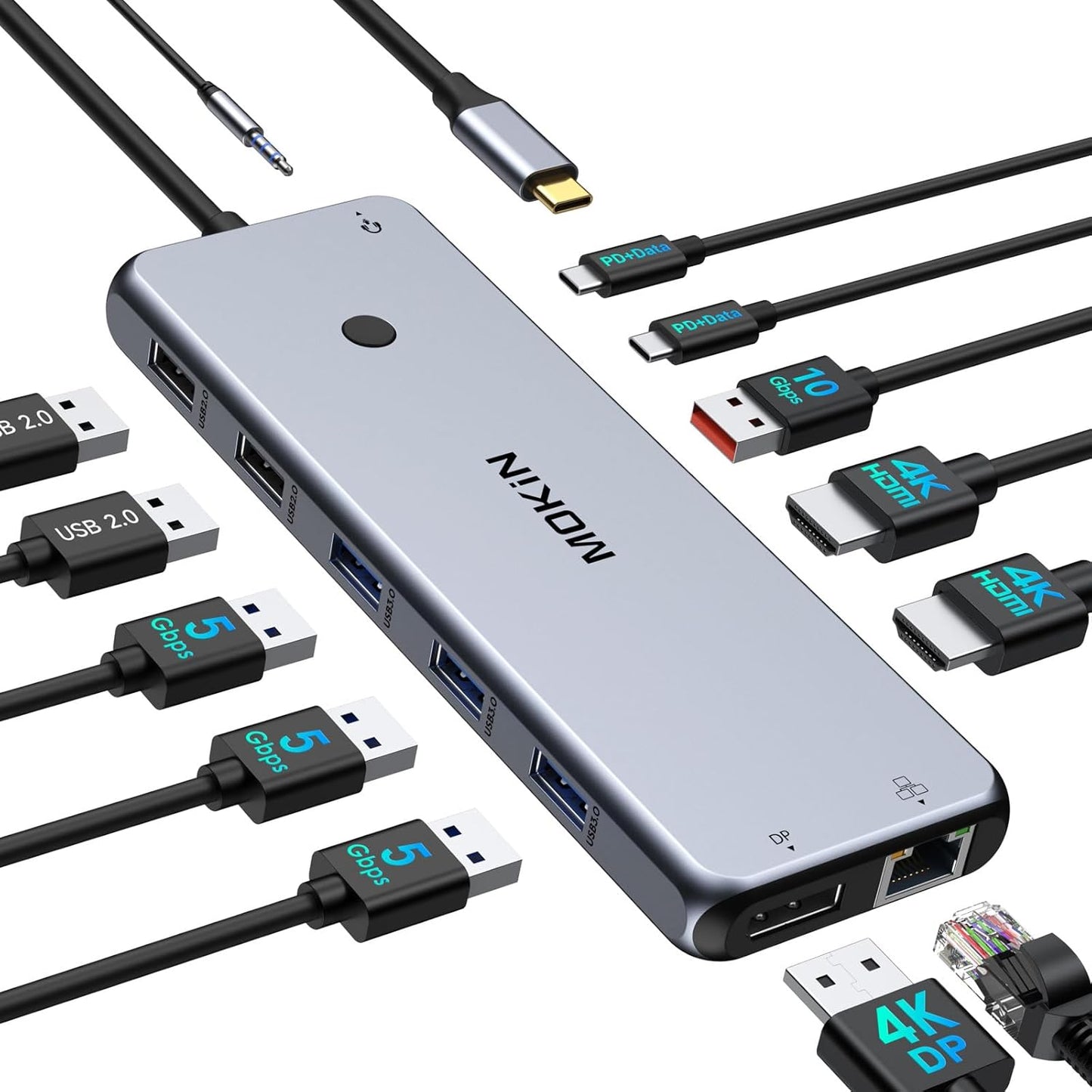
- 13-in-1 design: Combines dual 4K HDMI, a DisplayPort and a wide mix of USB-C and USB-A ports to replace multiple dongles with one compact dock.
- Triple monitor support: Offers HDMI+HDMI+DP outputs so Windows users can run up to three external screens and extend their desktop for productivity.
- Fast data transfer: Includes 2x USB-C 3.1 and USB-A 3.1 ports capable of 10Gbps-class speeds for large file moves and fast peripheral access.
- Reliable wired networking: Built-in Gigabit RJ45 Ethernet provides a stable 1000Mbps connection for low-latency work and large uploads or downloads.
- Power delivery charging: USB-C PD pass-through supports up to 100W input with an 85W safety-limited output to keep a laptop charged while using multiple ports.
- Memory and audio support: SD and TF card slots plus a 3.5mm audio jack add media access and headset compatibility without extra adapters.
Who It's For
This dock is best for laptop owners with full-function USB-C or Thunderbolt 3/4 ports who need extensive connectivity at a desk: remote workers, video editors, developers or anyone who wants multiple monitors, wired Ethernet and many USB ports from a single cable. The plug-and-play behavior makes it attractive to users who prefer simple setup without driver installs.
Those using MacOS with modern Macs should be cautious: while the hardware supports three outputs, MacOS limits external displays so external screens mirror rather than extend in many configurations. Users who require native multi-monitor extended desktop support on Mac should confirm compatibility before buying.
Pros & Cons
Pros
- Comprehensive port selection replaces several adapters with one unit for a cleaner desk setup.
- Supports dual 4K HDMI plus DP for multi-display workflows on Windows systems.
- High-speed USB-C 3.1 and USB-A 3.1 ports and Gigabit Ethernet enable fast transfers and stable networking.
- PD charging keeps a laptop powered while using multiple peripherals, up to the 85W safety limit.
Cons
- MacOS does not offer the same extended triple-monitor behavior as Windows, so display setup can be limited on Apple laptops.
- PD output is capped at 85W even though the dock accepts up to 100W input, which may be insufficient for the most power-hungry laptops.
Specifications
| Brand | MOKiN |
| Ports | 2x HDMI, 1x DisplayPort, Gigabit RJ45, 2x USB-C 3.1, 1x USB-A 3.1, 3x USB-A 3.0, 2x USB-A 2.0, SD/TF, 3.5mm Audio |
| Video | Dual 4K HDMI + DP output; triple monitor support on Windows |
| Power Delivery | Supports up to 100W input; 85W max output |
| Data Speed | USB 3.1 ports up to 10Gbps; Gigabit Ethernet 1000Mbps |
| Compatibility | Devices with Thunderbolt 3/4 or full-function USB-C ports |
Our Verdict
The MOKiN USB C Docking Station is a strong choice for Windows laptop users who need a single dongle to handle multiple monitors, wired networking and many USB devices while keeping the laptop charged. It delivers good value for workstation-style use, though Mac users should verify multi-display needs due to OS limits and power users with very high charging demands should note the 85W output cap.
Frequently Asked Questions
Can this dock charge my laptop?
The PD passthrough accepts up to 100W and will supply up to 85W to a connected laptop that supports PD charging.
Will it run three different external screens?
On Windows systems it supports triple-monitor setups via HDMI+HDMI+DP; on MacOS external screens may mirror rather than extend.
Does it need drivers?
No additional drivers are required for typical plug-and-play use on compatible USB-C or Thunderbolt laptops.
Editor's Take
The MOKiN 13-in-1 USB C Docking Station is a practical, value-packed dock for Windows laptop users who need multiple displays, wired Ethernet and many USB ports in a single plug-and-play unit; Mac users should check multi-display limits and power users note the 85W output cap.

Recently viewed
Recently viewed products will appear here as customers browse the store.