

USB C Docking Station Triple Display 12-in-1 USB C Hub - Multiport
USB C Docking Station Triple Display 12-in-1 USB C Hub - Multiport
Price subject to change. Tap below for current.
Couldn't load pickup availability
Our review of the USB C Docking Station Triple Display 12-in-1 finds it best suited for professionals who need a compact hub that doubles as a true workstation replacement. With a mix of dual DisplayPort and twin HDMI outputs, a 100W PD input that passes up to 85W to a laptop, a 2.5G Ethernet-class wired connection and multiple USB ports, the dock focuses on connectivity and convenience. The single biggest reason to buy is the ability to drive multiple high-resolution displays and charge a laptop while maintaining stable wired networking in one plug-and-play package.
Key Features
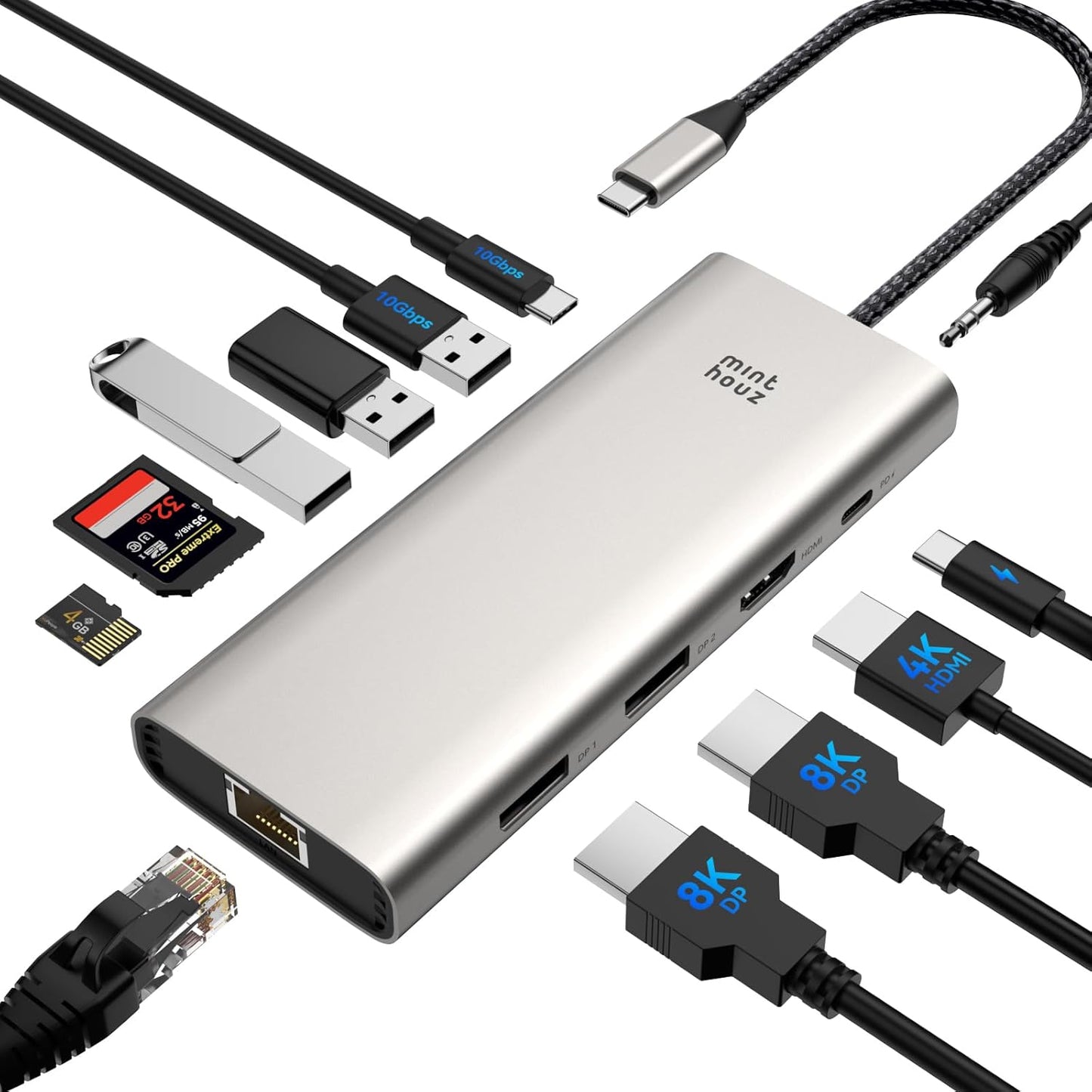
- Triple display outputs: Provides a combination of DP and HDMI ports so users can connect up to three displays for expanded desktop workflows or immersive gaming setups.
- High resolution support: Supports DP 4K and DP 144Hz capabilities alongside dual HDMI 4K@60Hz outputs where supported, giving flexibility for high refresh or high pixel-count monitors.
- 85W pass-through charging: Allows a connected USB-C power adapter to supply up to 85W to a laptop while the dock powers attached peripherals for continuous use.
- Broad compatibility: Plug-and-play operation with major laptop lines such as Dell XPS, Lenovo ThinkPad, HP Elitebook and MacBook Pro/Air where the host supports USB-C video output.
- Full desktop I/O: Includes 2x USB 3.0, 2x USB 2.0, SD and TF card slots, Gigabit-class Ethernet and a 2-in-1 3.5mm audio/mic port for common workstation needs.
Who It's For
This dock is aimed at visual creators, remote workers and anyone who needs multiple external displays and a reliable wired network in a compact hub. It is particularly useful for users with Windows laptops that support Multi-Stream Transport under DP1.4 and DSC 1.2 or machines with native USB-C DisplayPort Alt Mode.
It is less ideal for Mac laptop owners who expect independent MST daisy-chaining, since Multi-Stream Transport is not supported on Mac laptops and displays may mirror rather than extend when connected through certain ports. Buyers who need specialized adapters or absolute plug-in-and-extend behavior on all macOS systems should verify compatibility first.
Pros & Cons
Pros
- Robust multi-monitor options let users run up to three displays using DP and HDMI connections.
- Pass-through charging up to 85W keeps a laptop powered while peripherals remain active.
- Comprehensive I/O with fast USB 3.0 ports, SD/TF slots and wired Ethernet reduces the need for extra dongles.
- Plug-and-play setup requires no driver installation for most modern laptops.
Cons
- Multi-Stream Transport is not supported on Mac laptops, so multi-monitor behavior differs on macOS compared with Windows.
- To reach the full 85W pass-through, a compatible 100W USB-C power adapter and cable are required but not included.
Specifications
| Product type | 12-in-1 USB C Docking Station |
| Video outputs | Dual DP (including DP1.4 support) and 2x HDMI 4K@60Hz |
| Power delivery | 100W PD input, up to 85W pass-through to laptop |
| USB ports | 2x USB 3.0 (5Gbps), 2x USB 2.0 |
| Network | Gigabit Ethernet (up to 1000Mbps) |
| Card readers | SD and TF slots (up to ~104MB/s) |
| Audio | 3.5mm 2-in-1 audio/mic jack |
Our Verdict
The USB C Docking Station Triple Display 12-in-1 is a practical, value-oriented dock for users who need multiple displays, reliable wired Ethernet and a broad range of ports in a single device. It is a strong fit for Windows laptops and creators who want expandable desktops; Mac users should confirm monitor behavior because MST is not supported on macOS. Overall it delivers versatile connectivity and pass-through charging at a reasonable price for a full-featured multiport hub.
Frequently Asked Questions
Can this dock charge my laptop?
Yes, it accepts a USB-C PD input and can pass through up to 85W to a connected laptop when used with a compatible 100W power adapter and cable.
Will it drive three independent monitors on a MacBook?
Multi-Stream Transport is not supported on Mac laptops, so displays connected via HDMI/DP may mirror rather than extend on macOS; Windows systems with DP1.4 and DSC offer fuller multi-monitor support.
Does it need drivers to work?
No driver installation is required for most supported laptops; it is designed to be plug-and-play when the host USB-C port supports Display and PD protocols.
Editor's Take
The USB C Docking Station Triple Display 12-in-1 is a practical multiport hub that delivers triple-display options, 85W pass-through charging and wired Ethernet, making it a strong choice for Windows users and creators who need expanded connectivity; Mac users should confirm multi-monitor behavior due to lack of MST support on macOS.

Recently viewed
Recently viewed products will appear here as customers browse the store.