

USB C Hub Multiport Adapter with M.2 SATA SSD Enclosure - 4K, 100W PD
USB C Hub Multiport Adapter with M.2 SATA SSD Enclosure - 4K, 100W PD
Price subject to change. Tap below for current.
Couldn't load pickup availability
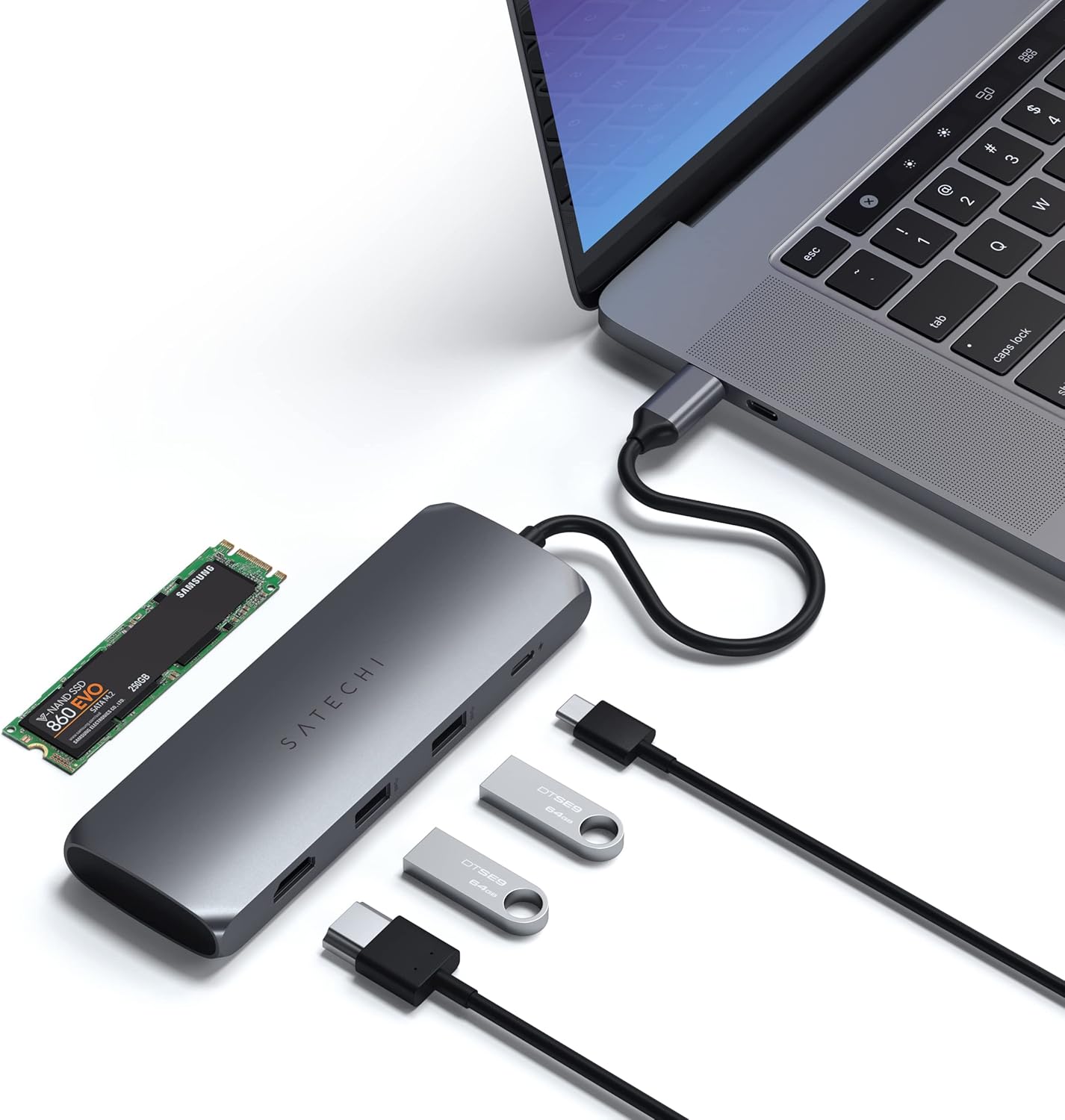
In this review of the USB C Hub Multiport Adapter with M.2 SATA SSD Enclosure, the bottom line is clear: this is a practical, space-saving dock for users who need an external SSD slot plus common ports without sacrificing the main USB C port. It suits laptop users who move large media files, back up photos, or want to add storage while keeping HDMI output and fast charging. The single biggest reason to buy is the built-in SATA M.2 enclosure that lets users carry one compact dongle instead of a separate SSD caddy and hub.
Key Features
- Built-In SSD Enclosure: Lets you add a SATA M.2 SSD for backups and extra storage without using another USB C port, simplifying mobile workflows.
- Vivid 4K HDMI: Outputs up to 4K at 60Hz to an external monitor for smooth video playback and screen extension when using a direct HDMI-to-HDMI connection.
- 100W USB C Power Delivery: Provides up to 100W charging so a connected laptop can remain powered during heavy use while still running peripherals.
- High-Speed USB A Ports: Two USB A ports support fast data transfer for cameras, thumb drives, and peripherals, making file moves and backups quicker.
- Compact Hybrid Design: Combines docking, display, power, and storage in a single adapter, reducing clutter for on-the-go professionals.
Who It's For
This adapter is best for creative professionals, photographers, and students who need a tidy way to add a SATA M.2 SSD, connect a 4K monitor, and charge a laptop from one compact hub. The integrated enclosure is especially handy when backing up photos or transporting large project files without a separate drive enclosure.
Users who require NVMe/PCIe SSD support should look elsewhere, since this unit supports SATA M.2 drives only. Also, if you need more than two USB A ports or very advanced docking features, a larger docking station may be a better fit.
Pros & Cons
Pros
- Built-in SATA M.2 enclosure removes the need to carry a separate SSD caddy.
- 4K HDMI at 60Hz delivers a clean external display experience for streaming and editing.
- Up to 100W USB C PD keeps a laptop charged while peripherals are in use.
- Two USB A ports provide fast data transfer for common accessories and drives.
Cons
- Does not support NVMe/PCIe M.2 drives, which limits peak SSD performance options.
- Some users report mixed temperature and speed behavior depending on the SSD used.
Specifications
| Brand | Satechi |
| Ports | Built-in M.2 SATA enclosure, 4K HDMI, 100W USB C PD, 2x USB A |
| SSD Support | SATA M.2 only (NVMe not supported) |
| HDMI Output | 4K at 60Hz (requires HDMI-to-HDMI) |
| USB A Speed | Up to 10Gbps per spec for USB 3.1 ports (device dependent) |
| Included | 2x silicon plugs, user manual, 2-year limited warranty |
Our Verdict
The USB C Hub Multiport Adapter with M.2 SATA SSD Enclosure is a smart choice for users who want consolidated storage, display output, and charging in a single dongle. It offers clear value for photographers and mobile professionals who need SATA M.2 storage and 4K output without extra accessories, though buyers who need NVMe speed should choose a different solution.
Frequently Asked Questions
Does it support NVMe M.2 drives?
Answer: No, the enclosure supports SATA M.2 drives only; NVMe/PCIe is not supported.
What is required for 4K 60Hz output?
Answer: A direct HDMI-to-HDMI connection to a compatible monitor is required for optimal 4K at 60Hz performance.
How much power can the PD port deliver?
Answer: The USB C Power Delivery port can deliver up to 100W, allowing most laptops to charge while using the hub.
Editor's Take
This compact USB C hub combines a SATA M.2 SSD enclosure, 4K 60Hz HDMI, and up to 100W PD charging, making it a practical, cost-effective choice for users who need added storage and display output on the go.

Recently viewed
Recently viewed products will appear here as customers browse the store.