

USB C KVM Switch 2 Monitors 2 Laptops - Dual 4K@60Hz KVM
USB C KVM Switch 2 Monitors 2 Laptops - Dual 4K@60Hz KVM
Price subject to change. Tap below for current.
Couldn't load pickup availability
In this review of the USB C KVM Switch 2 Monitors 2 Laptops, the bottom line is simple: this unit is for professionals who need to share two displays and multiple USB devices between two laptops while keeping a clean desk. The reviewer found the single-cable USB-C inputs, 80W PD pass-through and wired remote made switching quick and reliable in daily use. It is especially useful where dual 4K@60Hz output and fast USB 3.0 transfers are required, although correct USB-C Alt Mode cables and host compatibility are essential to get full video performance.
Key Features
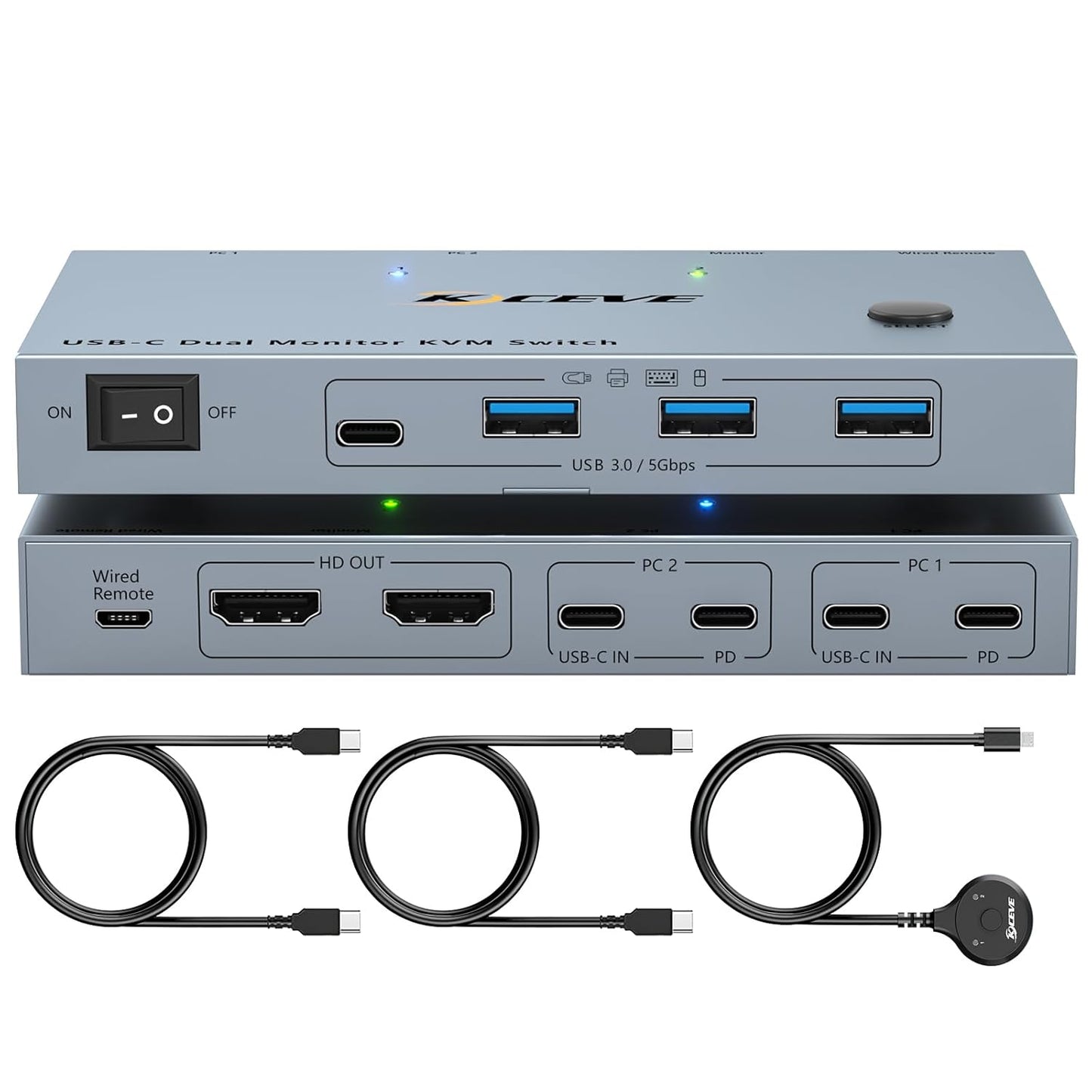
- Dual-monitor switching: Lets two laptops share two external monitors so a single workstation can toggle between systems without reconnecting multiple cables.
- Single-cable simplicity: Each laptop needs only one USB-C input cable that carries video, data and power delivery to minimize desk clutter.
- 80W PD charging: The built-in 80W power delivery port supplies laptop power during use so the laptops stay charged and the USB-C charging ports are not blocked.
- High-speed USB: Four USB 3.0 ports (three USB-A and one USB-C) provide up to 5 Gbps transfers for keyboards, mice, storage and other peripherals shared between computers.
- 4K visual support: Supports up to 4K@60Hz and higher refresh rates at lower resolutions, delivering sharp, fluid multi-monitor output when host and cables support it.
- Fast switching options: Offers both a top-panel button and a wired remote for quick, plug-and-play switching with LED indicators showing the active laptop.
Who It's For
This KVM is aimed at hybrid workers, developers, content creators and IT pros who regularly operate two laptops and need to share dual monitors and USB peripherals without a tangle of cables. It is a good fit where bandwidth for video and data matters, and where 80W PD keeps one or both laptops charged during long sessions.
It is less suitable for users with older laptops or cables that do not support USB Type-C Alt Mode (Video&Data&PD), or for Mac users with M1/M2 systems who require specific single-stream (SST) multi-display behavior instead of MST. Buyers should verify their laptops, monitors and cables support the stated resolutions for full performance.
Pros & Cons
Pros
- Clean single-cable inputs reduce desk clutter while carrying video, data and power.
- 80W PD pass-through keeps laptops charged and reduces the need for separate power adapters.
- 4 USB 3.0 ports and 5 Gbps transfers make sharing peripherals and external drives fast and convenient.
- Wired remote and button switching are responsive and easy to use in daily workflows.
Cons
- Full 4K@60Hz output depends on host, monitor and USB-C 3.1 Gen 2 Alt Mode cables, which must be sourced separately.
- Mac M1/M2 systems only support SST mode so some multi-monitor MST setups will not work on those machines.
Specifications
| Product type | USB C Dual Monitor KVM Switch |
| Display support | Up to 4K@60Hz, 2K@144Hz/120Hz |
| USB ports | 3 x USB-A 3.0 + 1 x USB-C 3.0 (5 Gbps) |
| Power delivery | 80W PD charging port |
| Inputs per computer | 1 x USB-C input cable (Alt Mode required) |
| Switching | Top-button and wired remote control with LED indicator |
| Included | 1 KVM switch, 2 USB-C cables, 1 wired remote, user manual |
Our Verdict
The USB C KVM Switch 2 Monitors 2 Laptops is a practical, well-rounded solution for users who need to share dual monitors and several USB devices between two laptops. With reliable 80W PD, fast USB 3.0 transfers and straightforward switching, it delivers good value for desk-based professionals who confirm their hosts and cables support USB-C Alt Mode and the desired resolutions.
Frequently Asked Questions
Do I need special cables to get video?
Yes. To get video from each laptop you must use USB Type-C 3.1 Gen 2 cables that support Alt Mode for Video, Data and PD.
Will this work with Mac M1 or M2?
It works, but Mac M1/M2 only support SST mode, not MST, so some multi-monitor modes available on Windows may not be supported.
Can the KVM charge my laptop while using it?
Yes. The KVM has an 80W PD charging port designed to supply sufficient power to most laptops while in use.
Editor's Take
This USB C KVM Switch is a solid choice for professionals who need to share two monitors and multiple USB devices between two laptops; 80W PD, 5 Gbps USB 3.0 and wired remote switching make it practical and good value if hosts and cables support Alt Mode.

Recently viewed
Recently viewed products will appear here as customers browse the store.