

USB C Laptop Docking Station with Dual 4K HDMI + 8K DP - Triple
USB C Laptop Docking Station with Dual 4K HDMI + 8K DP - Triple
Price subject to change. Tap below for current.
Couldn't load pickup availability
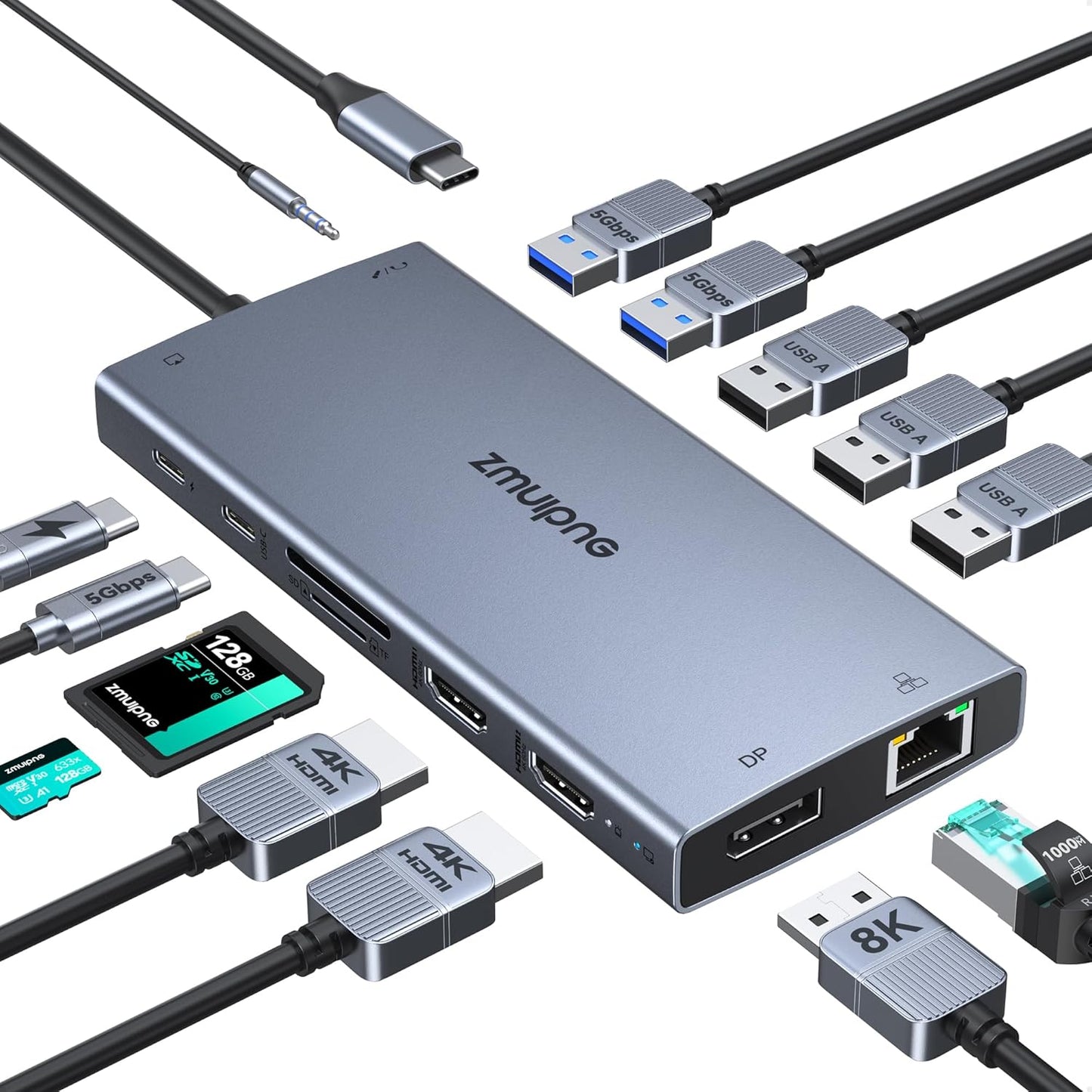
In this review the USB C Laptop Docking Station aims squarely at professionals and power users who need to add multiple displays and ports from a single type C or Thunderbolt 3 port. The bottom line: this 15 in 1 USB C hub delivers a very practical mix of video outputs, data ports and wired networking, with the biggest reason to buy being its triple display capability that supports dual 4K@60Hz and an 8K@30Hz DP output in the configurations described. It is a plug-and-play docking option for Windows laptops and many popular models, and includes a PD passthrough and a wake/turn off display button for convenience.
Key Features
- Triple display support: The hub can drive two HDMI displays at 4K@60Hz and a DisplayPort up to 8K@30Hz, or combine outputs for dual 4K@60Hz depending on monitor setup.
- 15 in 1 connectivity: It expands a single USB C port into multiple ports including 3 USB 3.0, 1 USB C 3.0, 2 USB 2.0, SD/TF readers, and a 3.5mm audio/mic jack for peripherals.
- 100W PD charging pass-through: The USB C PD port supports fast charging while the dock itself uses about 13W, leaving up to 87W available for laptop charging.
- Gigabit Ethernet: Built-in 1 Gbps Ethernet provides a reliable wired network connection for downloads, streaming and low-latency work.
- One-touch display button and detection lamp: A wake/turn off display button lets users switch displays quickly and the compatibility detection lights indicate if the dock is recognized by the laptop.
Who It's For
This docking station is best for Windows laptop users, mobile professionals and home office setups that need multiple external monitors and a broad selection of ports without carrying multiple dongles. It fits well with Dell XPS, Latitude, many ThinkPad models and Surface devices that support USB C or Thunderbolt 3 display output.
It is less suited for Mac users who require independent extended displays beyond mirror mode, since Mac OS only supports mirror mode on this hub. Also, users who expect full 100W charging should account for the dock's 13W draw, leaving up to 87W for the host laptop.
Pros & Cons
Pros
- Supports dual 4K@60Hz and an 8K@30Hz DP option for flexible triple display setups.
- Comprehensive 15 in 1 port selection including SD/TF card readers and Gigabit Ethernet.
- Fast USB 3.0 data ports and a PD charging port make it a practical all-in-one dock.
Cons
- Some users report occasional port functionality issues, so results can vary by laptop model and cables used.
- Mac OS is limited to mirror mode for multi-monitor output rather than extended displays.
Specifications
| Model type | USB C Laptop Docking Station, 15 in 1 |
| Video outputs | 2x HDMI (up to 4K@60Hz), 1x DP (up to 8K@30Hz or 4K@144Hz) |
| USB ports | 3x USB 3.0, 1x USB C 3.0 (data only), 2x USB 2.0 |
| Power delivery | 100W USB C PD port (dock uses 13W, up to 87W to laptop) |
| Ethernet | 1 Gbps Gigabit Ethernet (10/100/1000BASE-T) |
| Card readers | SD and Micro SD (TF) card readers |
| Audio | 3.5mm combined mic/audio jack |
Our Verdict
The USB C Laptop Docking Station is a strong value for Windows users who need robust multi-monitor support and a full set of ports in a single dongle. It combines dual 4K HDMI, an 8K capable DP, fast USB 3.0 ports, Gigabit Ethernet and PD passthrough, making it a practical desktop hub for productivity and media workflows, provided users accept Mac OS mirroring limits and verify compatibility with their laptop.
Frequently Asked Questions
Will this hub charge my laptop at full speed?
The PD port supports up to 100W but the dock itself consumes about 13W, so expect up to roughly 87W available to charge the laptop.
Can I run three independent extended displays on a Mac?
No, Mac OS only supports mirror mode with this hub; independent extended displays are supported on Windows.
Do I need special cables for the monitors?
You should use HDMI to HDMI or DP to DP cables as noted; the hub requires direct monitor-to-hub video cables for the supported resolutions.
Editor's Take
This 15 in 1 USB C docking station is a practical, value-focused hub for Windows users who need dual 4K HDMI and an 8K DP option, plus PD charging and Gigabit Ethernet, though Mac OS is limited to mirror mode.

Recently viewed
Recently viewed products will appear here as customers browse the store.