

USB C to HDMI Adapter - Extend to 1440p@60Hz for USB 3.0 and USB-C
USB C to HDMI Adapter - Extend to 1440p@60Hz for USB 3.0 and USB-C
Price subject to change. Tap below for current.
Couldn't load pickup availability
In this review of the USB C to HDMI Adapter, the bottom line is simple: this adapter is for anyone who needs an affordable, compact way to add a single 2560x1440 external display from a USB 3.0 or USB-C port. The reviewer found the hybrid 2-in-1 cable convenient because it works with both older USB-A and modern USB-C or Thunderbolt ports, and it reliably delivers a crisp 1440p image at 60Hz on supported systems when the correct drivers are installed.
Key Features
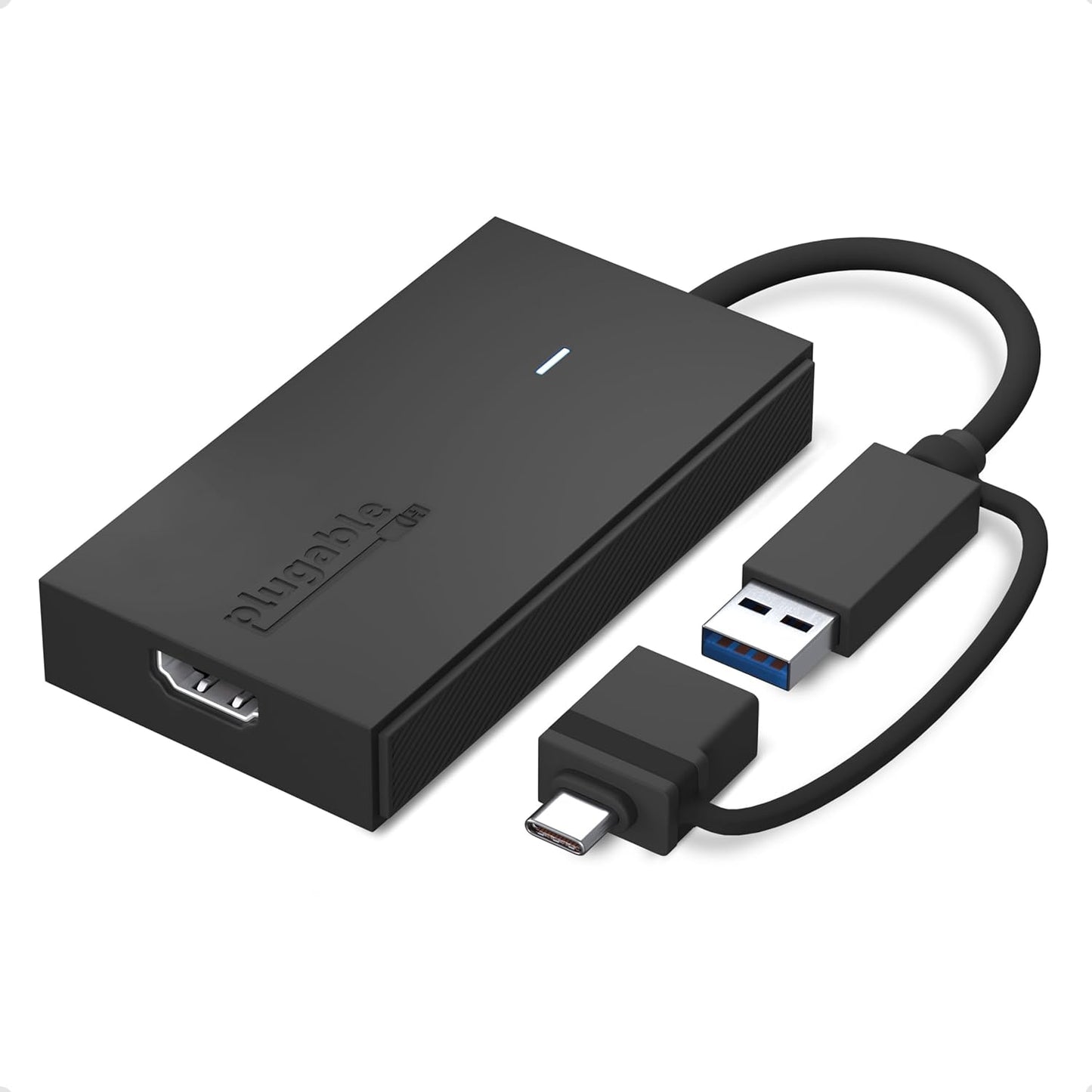
- Hybrid 2-in-1 cable: The included cable connects to either USB 3.0 or USB-C ports so the same adapter works across a range of laptops and docks.
- 1440p@60Hz output: The adapter supports up to 2560x1440 at 60Hz for a sharper, smoother external display suitable for spreadsheets and web work.
- Multi-adapter expandability: Windows and ChromeOS users can chain multiple adapters with a docking station to support several 1440p displays for larger multi-monitor setups.
- Wide compatibility: Works with Windows 10 and 11, macOS 10.14 or later, and ChromeOS 100 or later provided the SMI driver is installed.
- Plug-and-play convenience: The small form factor and hybrid cable mean the adapter is easy to carry and less likely to be left behind when switching between devices.
Who It's For
This adapter is best for professionals and students who need to extend screen real estate quickly without replacing a docking station, and for users with a mix of USB-A and USB-C devices who appreciate a single hybrid cable solution. It is also useful for small multi-monitor setups where one 1440p display per adapter is needed.
Users who need protected-streaming with HDCP (for example, direct Netflix or Hulu playback through the adapter) should look elsewhere, as the adapter does not support HDCP-protected content. Gamers or video editors requiring ultra-low latency or native GPU-driven multi-monitor gaming setups should consider a native video output or a full-featured dock instead.
Pros & Cons
Pros
- Works with both USB 3.0 and USB-C/Thunderbolt ports thanks to the hybrid cable.
- Supports crisp 2560x1440 at 60Hz for improved productivity and clearer text.
- Expandable for Windows and ChromeOS users to add multiple adapters to an existing dock.
Cons
- Does not support playback of HDCP-protected streaming content like some services require.
- Requires SMI driver installation; not compatible with DisplayLink drivers, which adds a setup step.
Specifications
| Brand | Plugable |
| Connection | Hybrid USB 3.0 (USB-A) or USB-C (including USB4/Thunderbolt) |
| Maximum Resolution | 2560x1440 at 60Hz |
| Supported OS | Windows 10/11, macOS 10.14+, ChromeOS 100+ |
| Driver | SMI driver required; not compatible with DisplayLink |
| Use Case | Extend one additional HDMI display; multi-adapter expansion on Windows/ChromeOS |
Our Verdict
The USB C to HDMI Adapter is a practical, cost-effective way to add a single high-resolution external display for office work and multitasking. Its hybrid cable and support for 1440p@60Hz make it a versatile choice for mixed-port environments, though those needing HDCP playback or plug-free driver setups will want to consider alternatives. For users who need extra screen space without a full dock, it offers clear value.
Frequently Asked Questions
Will this adapter play Netflix or other protected streams?
It does not support HDCP-protected content, so streaming services that require HDCP will not play through the adapter.
Do I need to install drivers?
Yes, SMI driver installation is required for operation; it is not compatible with DisplayLink drivers.
Can I use multiple adapters to add several monitors?
Yes. On Windows and ChromeOS you can use multiple adapters with an existing docking station to support several 2560x1440 displays; macOS supports up to four adapters under the right configuration.
Editor's Take
The USB C to HDMI Adapter is a compact, affordable way to add a single 2560x1440@60Hz external display using a hybrid USB-A/USB-C cable; it is ideal for productivity setups but does not support HDCP streaming and requires an SMI driver.

Recently viewed
Recently viewed products will appear here as customers browse the store.