

Versatile USB C Docking Station for iPad 11-in-1 - Foldable 4K Hub
Versatile USB C Docking Station for iPad 11-in-1 - Foldable 4K Hub
Price subject to change. Tap below for current.
Couldn't load pickup availability
In this review of the Versatile USB C Docking Station for iPad, the bottom line is simple: it is best for users who need a compact, foldable hub that doubles as a tablet stand and supports a wide range of devices while offering full-size ports like Gigabit Ethernet and 4K@60Hz HDMI. The single biggest reason to buy is the combination of an 11-in-1 port array with a rotatable aluminum stand that turns an iPad, tablet, or compatible handheld into a usable workstation or gaming console setup. It is a practical choice when you need expanded connectivity without carrying separate adapters.
Key Features
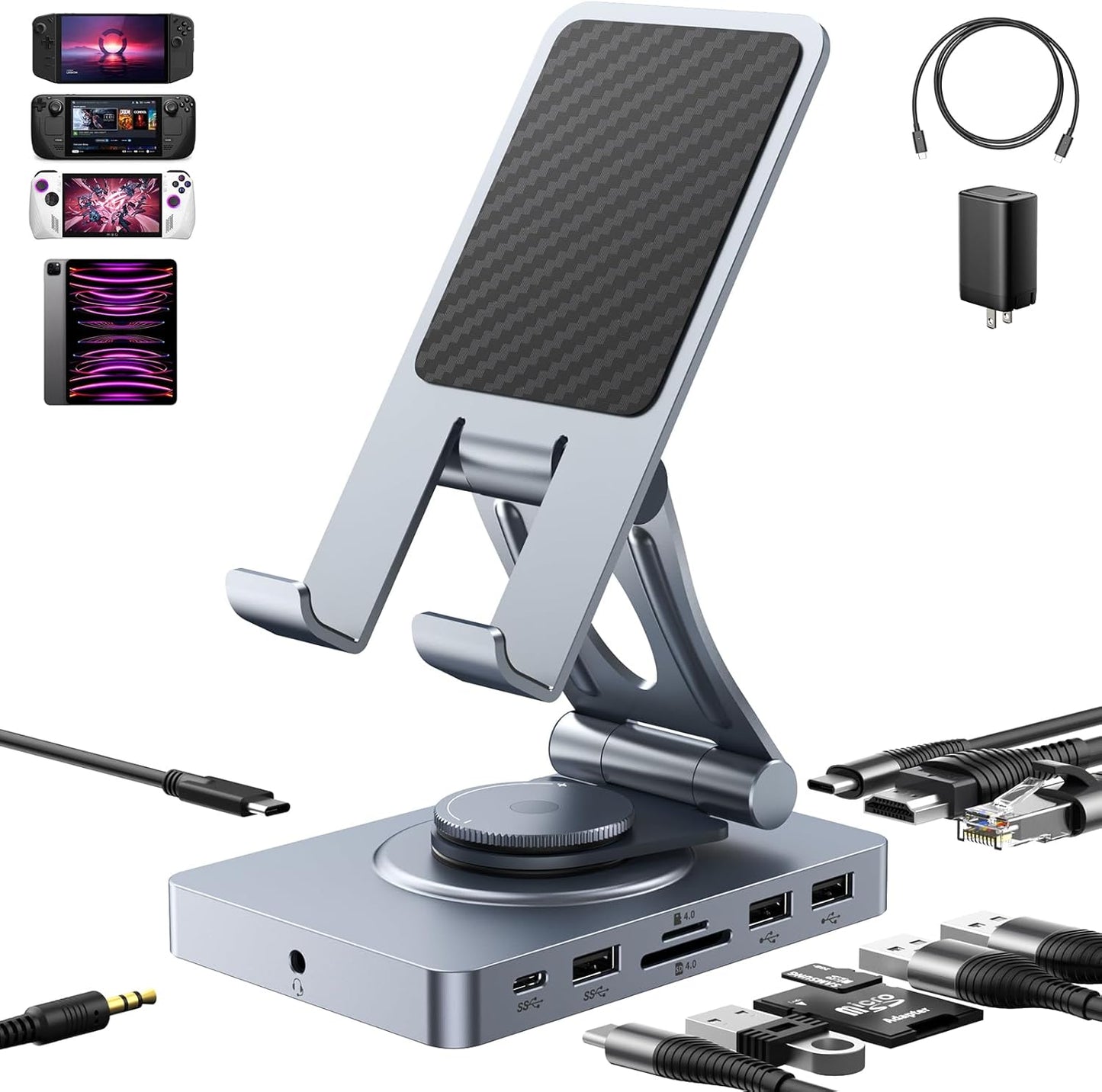
- 11-in-1 expansion: Provides a full set of ports including SD/TF 4.0, 4K@60Hz HDMI, Gigabit Ethernet, audio, multiple USB-A and USB-C ports so you can connect monitors, drives, and peripherals at once.
- Rotatable foldable stand: The dock can rotate 360 degrees and fold flat so it works as a stable stand for many tablets or as a low-profile docking base for laptops.
- High-speed SD/TF 4.0 reader: The SD and TF slots use the latest 4.0 standard for up to about 300Mbps transfers, ideal for quick camera backups when the card supports high-speed mode.
- 100W PD support with E-Mark cable: The included E-Mark USB-C cable and PD input support up to 100W, which helps preserve original charging speeds when multiple ports are used.
- Broad compatibility: Works without drivers across iPadOS, macOS, Windows, Chrome OS, Android, Linux and supports devices like Steam Deck, ROG Ally, Legion Go, tablets and many laptops.
Who It's For
This dock is aimed at iPad and tablet owners who want to expand their device into a desk setup for productivity, media, or gaming; it also suits handheld PC users such as Steam Deck and ROG Ally owners who need Ethernet and video out. Creators with SD cards who value faster transfers will appreciate the SD/TF 4.0 slots.
It is less ideal for users who expect a heavy-duty laptop stand: when used as a support for larger devices like Surface Pro or portable monitors it can be placed on top but may not offer full stability. Also, if you do not plan to use many ports simultaneously, the 65W adapter option is optional because heavy port use draws extra power from the host.
Pros & Cons
Pros
- Comprehensive port set including Gigabit Ethernet and 4K@60Hz HDMI for true workstation use.
- Sturdy metal finish and a rotatable, foldable design that doubles as a stand and a portable hub.
- Fast SD/TF 4.0 reader and 100W PD via an E-Mark cable to maintain charging under load.
Cons
- Build quality feedback is mixed among customers, so some units may feel less robust than others.
- Not a full replacement for a heavy-duty stand for larger tablets or portable monitors and may need extra support.
Specifications
| Product type | 11-in-1 USB-C docking station and foldable stand |
| Video output | 4K@60Hz HDMI |
| Card reader | SD and TF 4.0 (up to ~300Mbps) |
| Network | Gigabit Ethernet (RJ45) |
| Power delivery | USB-C PD in up to 100W (E-Mark cable) |
| Audio | 3.5mm audio jack |
| Compatibility | iPadOS, macOS, Windows, Android, Linux, Chrome OS; devices with USB-C |
Our Verdict
The Versatile USB C Docking Station is a strong pick for anyone who needs a portable hub that also functions as a tablet stand and supports multiple full-size ports. It delivers good value for creators and handheld PC users thanks to the SD/TF 4.0 reader, Gigabit Ethernet and 4K output, though buyers who expect flawless build consistency or a heavy-duty stand for large tablets should consider that there are limits. Overall, it is a flexible, well featured hub for mixed tablet and laptop workflows.
Frequently Asked Questions
Will this dock charge my device at full speed?
If you use a high-power adapter (the 65W or higher version), the dock can preserve original charging speeds because PD input and an E-Mark cable support up to 100W; using a lower-power adapter may reduce host charge when many ports are active.
Does the dock require drivers?
No, the docking station works without drivers across common systems including iPadOS, macOS, Windows, Android and Linux.
Can it extend an iPad display to an external monitor?
Some iPad models with iPadOS 16.2 and above support extended displays; others will mirror only. Check your iPad model and software version for extended display support.
Editor's Take
A flexible 11-in-1 USB-C docking station that doubles as a foldable tablet stand, offering 4K@60Hz, SD/TF 4.0 and Gigabit Ethernet for creators and handheld PC users; good value but build consistency varies.

Recently viewed
Recently viewed products will appear here as customers browse the store.