

VGA KVM Switch 8 Ports - 8-Port USB VGA KVM Switch with Remote
VGA KVM Switch 8 Ports - 8-Port USB VGA KVM Switch with Remote
Price subject to change. Tap below for current.
Couldn't load pickup availability
In this review of the VGA KVM Switch 8 Ports, the bottom line is simple: it is a practical solution for small offices, classrooms, and home labs that need to control multiple VGA-equipped computers from a single keyboard, mouse and monitor. The greatest reason to buy is straightforward control and tidy cables - this unit supports 8 computers, includes 8 dedicated KVM VGA cables and offers three switching methods (front buttons, IR remote, and a desktop controller) that make multi-computer workflows much less cluttered. Setup is plug-and-play for most systems and it covers common OS options without drivers.
Key Features
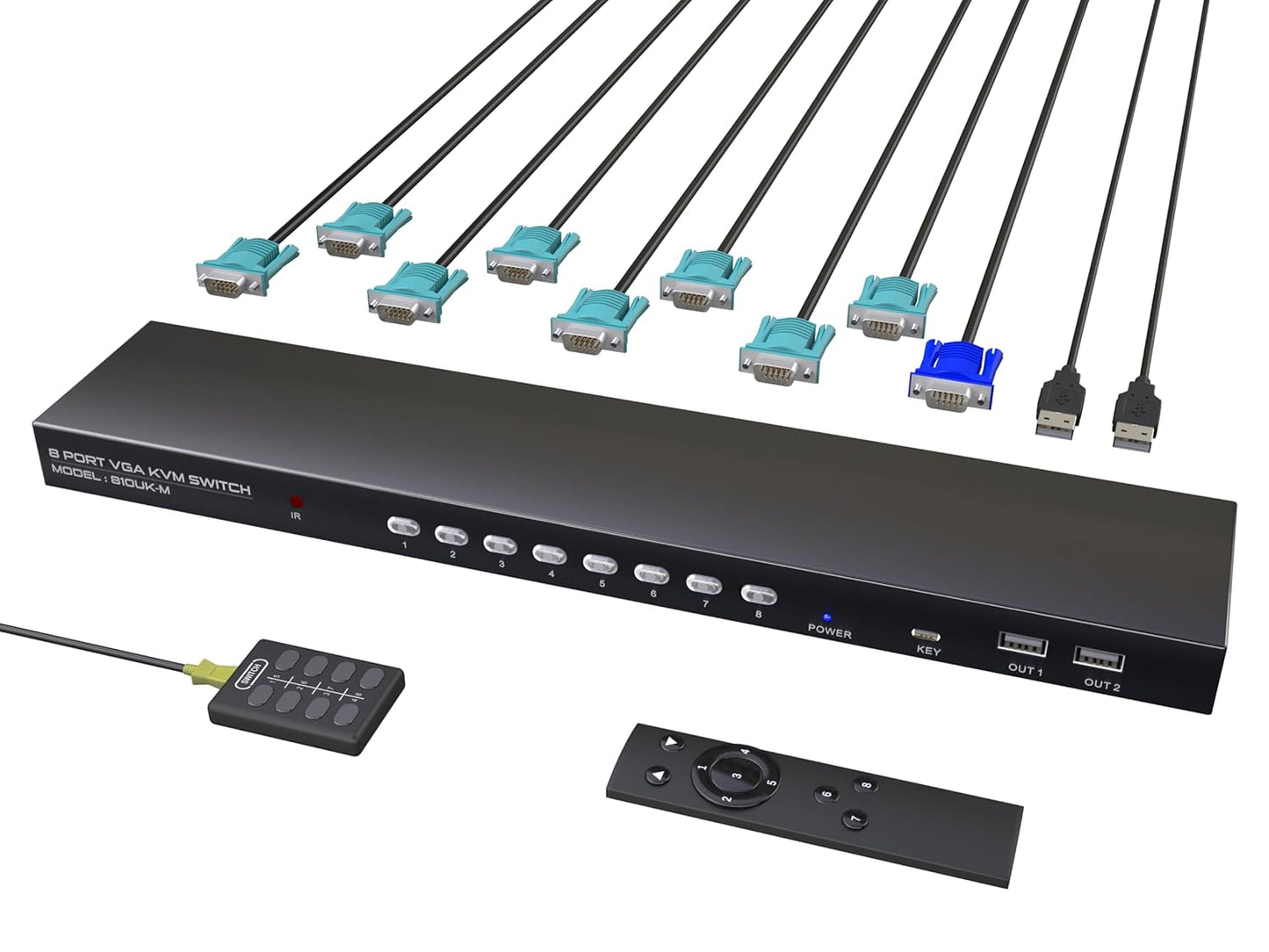
- 8-Port VGA switching: Lets one monitor, keyboard and mouse be shared across eight VGA-equipped computers to simplify multi-PC control.
- Integrated USB 2.0 hubs: Four shared USB 2.0 ports allow common peripherals such as printers, scanners or external drives to be accessed from the selected computer.
- Three switching methods: Change active hosts using front-panel buttons, the included IR remote, or the desktop controller to keep the desk clean and quick to operate.
- Included cabling and accessories: Ships with 8 KVM VGA cables, an IR remote, a desktop controller and a user guide so the unit is ready to install out of the box.
- Wide OS compatibility: Works with Windows, Mac OS X, Linux, Android and DOS systems without extra drivers, providing broad cross-platform support.
- 1080P Full HD support: Supports up to 1920 x 1440 resolution for clear VGA output and auto-recognition of connected displays.
Who It's For
The VGA KVM Switch 8 Ports is best for small businesses, IT labs, classrooms and home users who maintain several legacy or secondary PCs with VGA outputs and want to centralize input devices and a monitor. It is especially useful when a small team needs to demo or test different machines without physically swapping peripherals.
It is less suited for setups that rely exclusively on USB-C or docking stations, or for those who need native HDMI or DisplayPort switching. Users who depend on long-range wireless keyboard/mouse dongles should check the wireless device range limits before buying.
Pros & Cons
Pros
- Includes all connection cables and both IR remote and desktop controller for flexible switching.
- Shares four USB 2.0 devices in addition to keyboard and mouse, making peripheral sharing straightforward.
- Plug-and-play across major operating systems with no drivers required.
- Supports 1920 x 1440 resolution for usable Full HD display quality over VGA.
Cons
- Not compatible with hosts that only have USB-C ports or with docking stations, limiting some modern laptop users.
- Some customers report mixed experience with screen brightness and connectivity in specific setups, so testing with your hardware is recommended.
Specifications
| Product type | 8-Port VGA KVM Switch |
| Video support | Up to 1920 x 1440 (Full HD) |
| USB hubs | 4 x USB 2.0 shared ports |
| Included items | 8 KVM VGA cables, 1 IR remote, 1 desktop controller, user guide |
| Switching methods | Front buttons, IR remote, desktop controller |
| OS compatibility | Windows, Mac OS X, Linux, Android, DOS (plug-and-play) |
Our Verdict
The VGA KVM Switch 8 Ports is a cost-effective, no-frills way to centralize control of up to eight VGA computers and share USB 2.0 peripherals. It delivers practical cable management and flexible switching options for labs, offices and classrooms where VGA remains in use, though modern USB-C or docking workflows will need a different solution. Overall, it offers solid value for users with legacy video outputs who want reliable multi-computer access.
Frequently Asked Questions
Will this work with USB-C only laptops?
The switch requires USB-A ports on host devices and is not compatible with laptops that only provide USB-C without a USB-A connection.
Can I share a printer and external drive at the same time?
Yes, the four shared USB 2.0 ports allow common peripherals like a printer and an external drive to be used by the selected computer, subject to USB 2.0 bandwidth limits.
Is any driver installation required?
No drivers are required; the unit is plug-and-play across supported operating systems, although refreshing keyboard and mouse drivers on each PC after connection is recommended for reliable switching.
Editor's Take
The VGA KVM Switch 8 Ports is a practical, cost-effective way to control eight VGA-equipped computers and share USB 2.0 peripherals; it offers tidy cable management and flexible switching but is not compatible with USB-C only hosts.

Recently viewed
Recently viewed products will appear here as customers browse the store.