

WAVLINK DisplayLink Docking Station Triple Monitor 4K@60Hz - 100W
WAVLINK DisplayLink Docking Station Triple Monitor 4K@60Hz - 100W
Price subject to change. Tap below for current.
Couldn't load pickup availability
In this review of the WAVLINK DisplayLink docking station, the bottom line is simple: this is a strong choice for users who need reliable triple-monitor support and generous port options in a single desktop hub. It stands out because it can drive three displays at 4K@60Hz while delivering up to 100W to a connected laptop, making it especially useful for professionals who juggle multiple apps, creators who need screen real estate, and home office users who want fewer adapters. Setup is straightforward if your laptop supports the required video and power standards.
Key Features
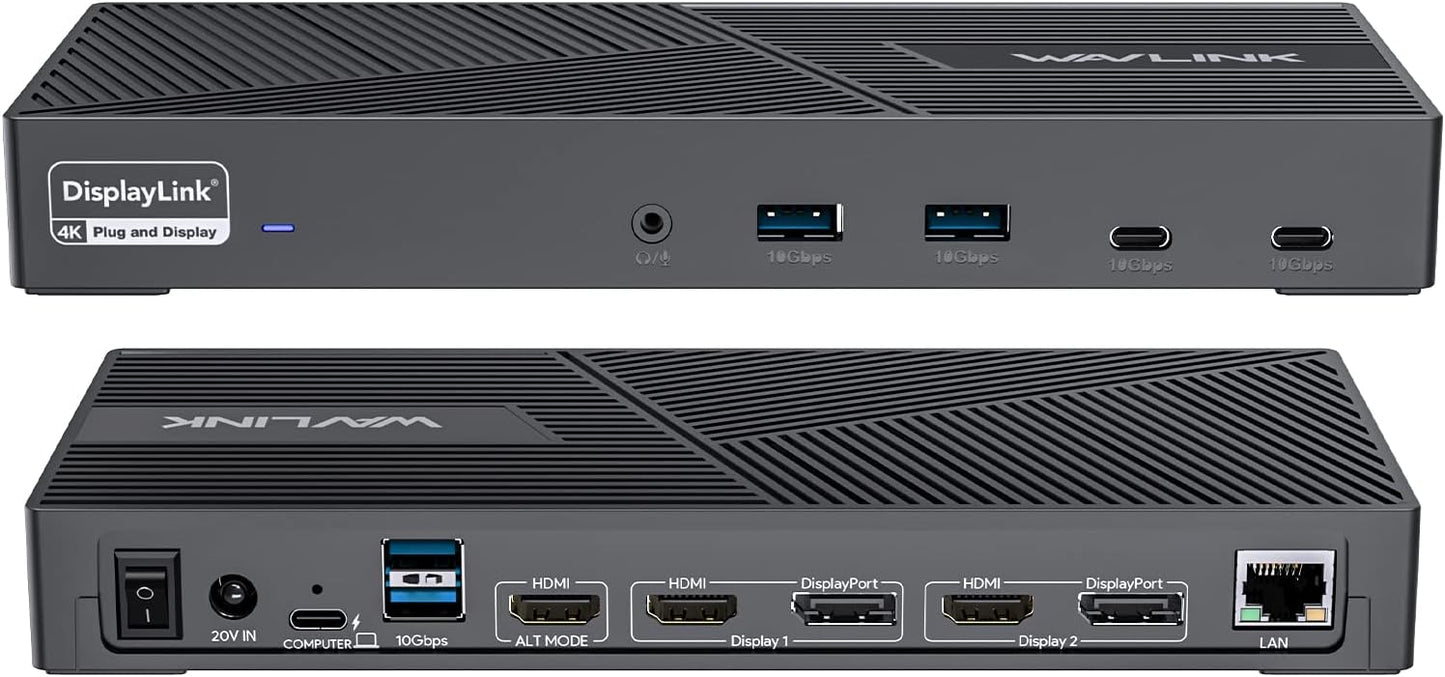
- Triple Monitor Support: Drives three external displays at 4K@60Hz for wide multitasking and crisp visuals when the host and cables support the needed video mode.
- High-Capacity Power: Includes a 160W power adapter and supplies up to 100W via the USB-C host port so a laptop can stay charged while powering peripherals.
- Wide Port Selection: Six USB Gen2 (10G) ports provide fast peripheral connections for storage, input devices, and accessories without constantly swapping cables.
- Reliable Networking: Built-in 1Gbps Ethernet offers stable wired networking for video conferencing and large file transfers compared with Wi-Fi.
- Audio Pass-Through: A dedicated audio port lets users connect headphones or speakers for clearer meetings and media playback.
- Cross-Platform Support: Works with a broad set of systems including Thunderbolt 3/4, USB-C hosts, Windows, Mac OS, Chrome OS, and selected Linux distributions when DisplayLink drivers are installed.
Who It's For
This docking station is aimed at power users who need multiple high-resolution displays and dependable charging from a single hub, such as designers, traders, developers, and anyone with a multi-monitor workstation. It is particularly useful in a home office or small office where desk space and cable clutter are concerns, and where wired Ethernet and several USB ports are required.
Users who rely on tablets with restricted video output or devices that do not support USB-C Alt Mode or DisplayLink should look elsewhere, and those expecting plug-and-play with every device should note that installing the latest DisplayLink drivers and confirming host power/video support may be necessary for full functionality.
Pros & Cons
Pros
- Supports triple 4K@60Hz displays for a wide, sharp workspace when the host supports required video modes.
- Provides up to 100W laptop charging from a bundled 160W adapter, keeping a system powered under load.
- Six USB Gen2 ports and gigabit Ethernet reduce the need for extra hubs and improve workflow efficiency.
- Clear audio port for headphones or speakers simplifies meeting and media setups.
Cons
- One HDMI port uses Alt Mode, so some laptops will need native USB-C video output to use all display outputs without extra adapters.
- Full functionality may require installing DisplayLink drivers and confirming OS compatibility before use.
Specifications
| Brand | WAVLINK |
| Display Support | Triple monitors at 4K@60Hz |
| Power Adapter | 160W included, up to 100W USB-C host charging |
| USB Ports | 6 x USB Gen2 (10G) |
| Ethernet | 1Gbps LAN |
| Video Outputs | 3 HDMI, 2 DisplayPort (note HDMI Alt Mode requirement) |
| Audio | Dedicated audio port |
Our Verdict
The WAVLINK DisplayLink docking station is a practical, value-focused hub for users who need multiple 4K displays, fast wired networking, and robust laptop charging from one device. It is a smart buy for desktop power users who can meet the host video and driver requirements, offering a compact way to consolidate peripherals and reduce cable clutter while maintaining strong performance.
Frequently Asked Questions
Can this dock charge my laptop at full power?
Yes, it supplies up to 100W via the USB-C host port using the included 160W adapter, provided your laptop supports USB-C power delivery.
Will all laptops run three 4K monitors at 60Hz?
Not always; one HDMI port requires a host USB-C port that supports video Alt Mode and some setups need DisplayLink drivers-confirm your laptop's video output capabilities first.
Which operating systems are supported?
Windows, Mac OS (10.14 to latest), Chrome OS, Android, Harmony OS and Ubuntu 20.04/22.04 are supported when drivers are installed; Unix, some Linux variants and iPad OS are not supported.
Editor's Take
A practical docking station for users who need three 4K@60Hz displays, strong wired networking and up to 100W charging; best for hosts that support USB-C video or DisplayLink drivers.

Recently viewed
Recently viewed products will appear here as customers browse the store.