

WD22TB4 Dell Thunderbolt 4 Dock 40Gbps - 13-Port Power and 4K Support
WD22TB4 Dell Thunderbolt 4 Dock 40Gbps - 13-Port Power and 4K Support
Price subject to change. Tap below for current.
Couldn't load pickup availability
In this review the WD22TB4 Dell Thunderbolt 4 Dock is evaluated for professionals who need a single-cable workstation hub with broad display and peripheral support. The bottom line: it is best for users who demand versatile connectivity and strong power delivery, since its 130W energy delivery and 13 ports let a laptop, multiple displays and peripherals run from one dock. The review examines real-world display capability, port layout and reliability to help decide if this dock suits an office or home workstation.
Key Features
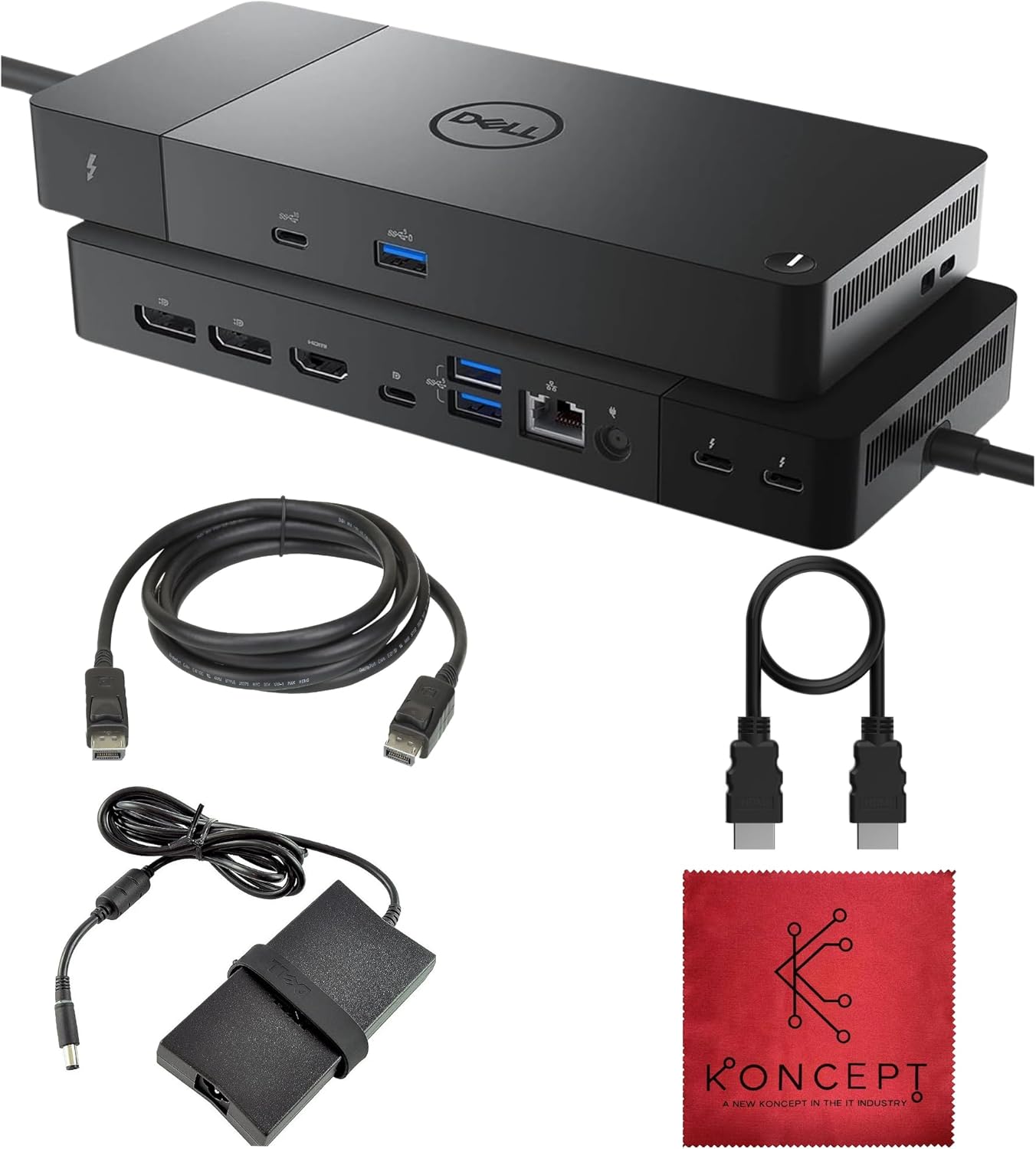
- 13 Ports for Versatility: The dock provides a wide mix of Thunderbolt 4, USB-C, USB-A, DisplayPort, HDMI, Ethernet and audio so users can connect laptops, storage, input devices and monitors without extra hubs.
- 130W Energy Delivery: With up to 130W delivered over the host cable, most larger laptops receive full charging while peripherals remain powered for a cleaner workspace.
- High-Bandwidth Thunderbolt 4: Two downstream Thunderbolt 4 ports and a host port at 40Gbps support fast data transfer and daisy-chaining compatible devices for demanding workflows.
- Flexible Display Support: Windows systems can drive up to four 4K 60Hz displays for intensive multitasking, while Mac compatibility notes platform limits so buyers know expected behavior.
- Reliable Wired Networking: The built-in Gigabit Ethernet port supplies a stable wired connection for video calls, large file transfers and low-latency gaming or streaming.
Who It's For
The WD22TB4 is ideal for business users, creative professionals and power users with Thunderbolt or USB-C laptops who need multiple high-resolution displays and a single-cable charging solution. Its mix of DisplayPort, HDMI and Thunderbolt outputs makes it suited to those who switch between docking at home and at the office.
It is less appropriate for users who prioritize ultra-long product longevity without warranty concerns; multiple customers reported failures after several months, so buyers who need multi-year reliability without potential replacement should weigh that risk. Casual users with only one external monitor or minimal peripheral needs may find it overkill.
Pros & Cons
Pros
- Extensive port selection covers almost every peripheral and display scenario, reducing the need for adapters.
- Strong 130W power delivery supports larger laptops and keeps accessories charged through one connection.
- High display bandwidth enables up to four 4K 60Hz monitors on compatible Windows hosts for serious multitasking.
- Gigabit Ethernet and audio jack add reliable wired networking and headset support for meetings.
Cons
- Some users reported durability issues, with units failing after several months; factor warranty coverage into the purchase decision.
- macOS display limits mean not all Macs can run multiple external 4K displays without extra adapters or DisplayLink solutions.
Specifications
| Brand | Dell (WD22TB4) - sold by Koncept |
| Ports | 13 ports including Thunderbolt 4, USB-C, USB-A, DP 1.4, HDMI 2.0, RJ45, 3.5mm |
| Thunderbolt Bandwidth | 40Gbps host and downstream ports |
| Power Delivery | Up to 130W to host device |
| Display Support | Up to four 4K 60Hz on Windows; single 4K 60Hz native on many macOS systems |
| Network | Gigabit Ethernet (1GbE) |
| Included Accessories | HDMI and DisplayPort cables and cleaning cloth noted with product |
Our Verdict
The WD22TB4 is a strong choice for professionals who need a single-cable docking solution with extensive ports, robust 130W power delivery and multi-4K display support on Windows. It represents good value for those who will use its full feature set, but prospective buyers should consider the reported longevity concerns and check warranty terms if long-term durability is a priority.
Frequently Asked Questions
Can this dock charge my laptop?
Yes, it delivers up to 130W of power delivery to the host laptop, sufficient for most larger notebooks.
How many external monitors can it run?
Windows hosts can support up to four 4K 60Hz displays; macOS is limited to one native 4K 60Hz in many cases unless using DisplayLink or M1 Pro/Max specific configurations.
Is wired Ethernet supported?
Yes, it includes a Gigabit Ethernet port for stable 1GbE network connections.
Editor's Take
The WD22TB4 is ideal for professionals needing 13 ports, 130W power delivery and multi-4K support on Windows; it offers excellent connectivity but some users reported durability issues, so review warranty options.

Recently viewed
Recently viewed products will appear here as customers browse the store.