

Wireless CarPlay Adapter for OEM Car Stereo - Plug & Play Wireless
Wireless CarPlay Adapter for OEM Car Stereo - Plug & Play Wireless
Price subject to change. Tap below for current.
Couldn't load pickup availability
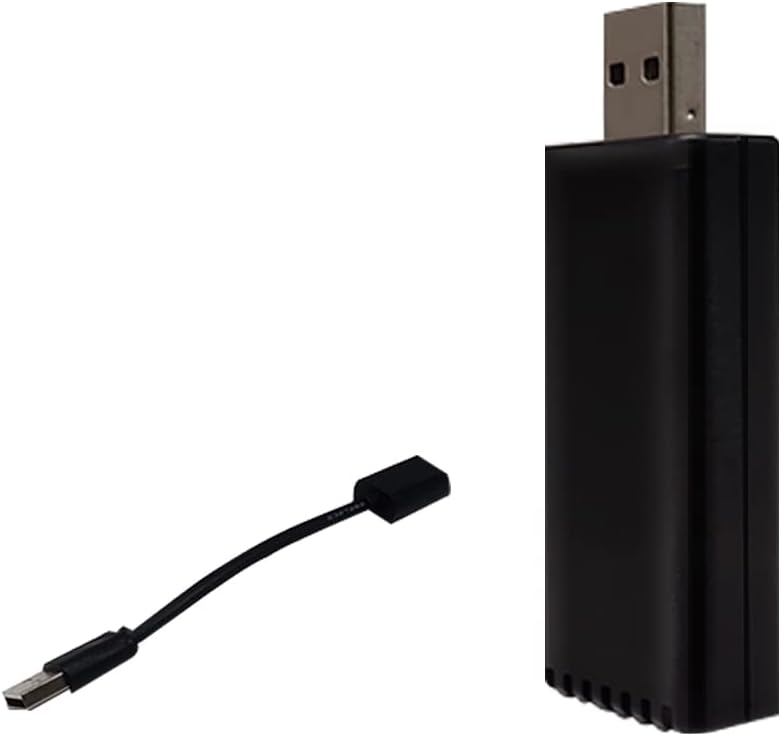
In this review of the Wireless CarPlay Adapter for OEM car stereo, the bottom line is simple: this small USB dongle turns a factory wired CarPlay system into a wireless one with minimal fuss, making it ideal for drivers who want a tidier cockpit and automatic phone connection. Installation is genuine plug and play - just insert into the car's CarPlay USB port, enable Bluetooth and Wi-Fi on the iPhone, pair the device named starting with CarPlay Box and the wireless CarPlay session connects automatically. The reviewer found it the fastest way to lose the cable while keeping the original CarPlay controls.
Key Features
- Plug and Play: USB plug-in installation takes seconds and does not require removing the OEM radio, so it is non-invasive and reversible.
- Wide iPhone support: Works with iPhone 6 and later running iOS 10 or above, allowing most modern iPhones to use CarPlay wirelessly.
- 5 GHz Wi-Fi module: The certified 5Ghz Wi-Fi delivers improved wireless bandwidth and a more stable media/voice experience.
- Automatic connection: Once paired, the adapter automatically connects to CarPlay when the iPhone is in the car, reducing repeated setup steps.
- OTA updates: Online firmware updates are supported, so compatibility and performance can be improved after purchase.
Who It's For
This adapter is best for drivers whose factory stereo already supports CarPlay over USB and who want a clutter-free, wireless experience while keeping the stock interface and controls. It suits commuters, rideshare drivers and anyone who uses CarPlay features like navigation, music and voice assistants frequently and prefers an automatic connection.
It is not for cars that lack a CarPlay-capable USB port or for users who require Android Auto support from the same dongle; buyers should confirm the vehicle's system supports CarPlay via USB before purchasing.
Pros & Cons
Pros
- True plug-and-play installation: no radio removal and connects in seconds.
- Automatic pairing and reconnecting saves time and keeps the phone hands-free.
- Certified 5Ghz Wi-Fi module improves streaming quality compared with 2.4 GHz-only devices.
- Supports OTA updates to maintain compatibility and add fixes.
Cons
- Requires an OEM USB port that already provides wired CarPlay; will not enable CarPlay where factory USB support is absent.
- Initial pairing requires navigating Bluetooth settings and allowing permissions on the iPhone.
Specifications
| Model Type | Wireless CarPlay USB adapter |
| Compatibility | iPhone 6 and later, iOS 10 or above |
| Connection | USB plug-in to factory CarPlay USB port; Bluetooth and Wi-Fi pairing |
| Wi-Fi | Certified 5Ghz Wi-Fi module |
| Installation | Plug and play; no radio removal |
| Updates | OTA online software update |
Our Verdict
The Wireless CarPlay Adapter is a practical, low-effort upgrade for owners of cars that already use wired CarPlay. It preserves the OEM interface while adding reliable wireless connectivity and 5Ghz performance, making it good value for anyone who wants to eliminate a cable without replacing the head unit. Confirm the vehicle has a CarPlay USB port before buying.
Frequently Asked Questions
Will this add wireless CarPlay to my car?
Yes, if your factory stereo supports CarPlay over USB; plug into the CarPlay USB port, enable iPhone Bluetooth and Wi-Fi, then pair the device listed as CarPlay Box.
Which iPhones are supported?
iPhone 6 and later running iOS 10 or above are supported for wireless CarPlay with this adapter.
How are updates handled?
OTA online software updates are supported; after connecting to wireless CarPlay follow the instructions or scan the provided QR code to access update options.
Editor's Take
The adapter is a low-effort way to convert a factory wired CarPlay system to wireless, offering plug-and-play USB installation, automatic reconnect and 5Ghz Wi-Fi for improved streaming; confirm your car has a CarPlay USB port before buying.

Recently viewed
Recently viewed products will appear here as customers browse the store.