

XP PEN Deco Pro Medium Graphics Tablet - 11x6 in Ultrathin Drawing Pad
XP PEN Deco Pro Medium Graphics Tablet - 11x6 in Ultrathin Drawing Pad
Price subject to change. Tap below for current.
Couldn't load pickup availability
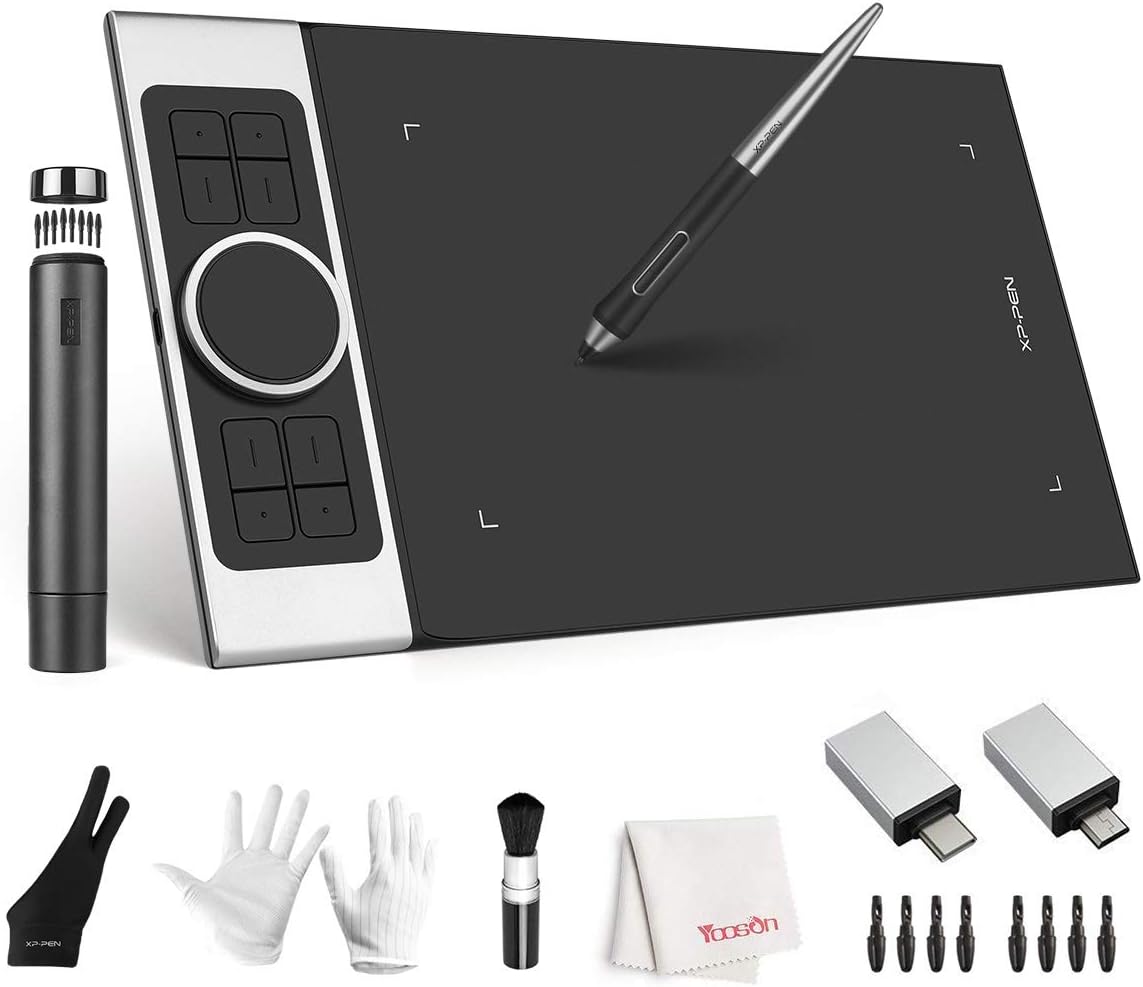
In this review the XP PEN Deco Pro Medium is evaluated as a midrange graphics tablet aimed at illustrators, designers and teachers who need a generous active area without a large footprint. The single biggest reason to buy is the combination of an 11x6 in active drawing space with a batteryfree pen that supports 8192 pressure levels and up to 60 degrees of tilt, which together make natural pen strokes, shading and precise line weight transitions easier than on smaller entry tablets.
Key Features
- Large active area: The 11x6 in drawing space gives room for broad, fluid strokes and comfortable arm movement for sketching, painting or lesson demonstrations.
- Batteryfree pen with 8192 levels: The stylus provides fine control over line thickness and opacity so pressure variation translates reliably to brush behavior.
- Tilt support: Up to 60 degrees of tilt enables natural shading techniques and more realistic brush effects for digital painting and photo retouching.
- Double wheel design: An outer mechanical wheel and inner virtual wheel let users zoom, change brush size and scroll without interrupting workflow.
- Customizable express keys: Eight programmable buttons and two dial wheels speed up repetitive actions and put common shortcuts at your fingertips.
- Wide compatibility: Works with Windows, Mac, Chrome OS and many major creative apps, making it versatile for different setups.
Who It's For
The Deco Pro M is well suited for digital artists, illustrators and online teachers who want a roomy active area without moving up to a display tablet. Its pressure sensitivity and tilt function appeal to users who work with brushes and need natural shading and pen behavior.
Those who need an onscreen display or absolute desktop mapping on a very large canvas may prefer a pen display or a larger tablet. Casual note takers who only need minimal drawing space could choose a smaller, more portable model instead.
Pros & Cons
Pros
- Large 11x6 in active area balances working space and desk footprint for most creators.
- Batteryfree stylus with 8192 pressure levels and 60 degree tilt delivers precise, natural strokes.
- Dual wheel layout plus 8 express keys accelerates workflow and reduces context switching.
- Broad OS and application compatibility makes it flexible for different software environments.
Cons
- Not a display tablet, so you must look at your monitor while drawing rather than drawing directly on a screen.
- Some advanced users may prefer a larger active area for fullbody or large scale illustrations.
Specifications
| Active area | 11 x 6 in |
| Pen | Batteryfree stylus, 8192 pressure levels |
| Tilt | Up to 60 degrees |
| Express controls | 8 customizable keys, 2 dial wheels |
| Compatibility | Windows, Mac OS, Android, Chromebook |
| Typical use | Sketching, digital painting, photo retouching, online teaching |
Our Verdict
The Deco Pro Medium is a strong value for creators who want natural pen feel and a roomy active area without the cost and desk footprint of a display tablet. It pairs a highprecision, batteryfree pen and tilt support with useful hardware controls that speed production, making it a practical choice for illustrators, designers and educators who work across multiple devices and apps.
Frequently Asked Questions
Does the pen require batteries?
The stylus is batteryfree and requires no charging, relying on the tablet for power.
Will it work with common creative apps?
Yes, the tablet is compatible with major programs such as Photoshop, Illustrator and other mainstream creative software.
Can it be used with a Chromebook or Android device?
Yes, it supports Chromebook and Android devices that meet the OS requirements stated by the manufacturer.
Editor's Take
The Deco Pro Medium pairs an 11x6 in active area with a batteryfree 8192 pressure pen and 60 degree tilt to deliver natural strokes and efficient controls, making it a strong choice for illustrators, designers and online teachers looking for value without a display tablet.

Recently viewed
Recently viewed products will appear here as customers browse the store.